Direct Answer: Job photos are first party data: proof you own that no competitor can copy and no AI tool can generate. Paired with a written caption naming the city, problem, and fix, they rank.
Most crews I work with in Monterey County finish a week with dozens of job photos and publish exactly none of them. Trench shots from Salinas, a re-piped bathroom in Marina, a root-wrecked drain line off a Prunedale road, a retaining wall in Carmel Valley. All of it sits in a camera roll or a text thread with the customer.
Meanwhile the website runs on stock photos of a smiling guy in a clean shirt holding a wrench. That same photo is on 400 other contractor sites right now.
A picture of a real repair at a real address in a real service area is the one thing a competitor cannot copy and an AI writing tool cannot produce. This is what first party data contractor marketing actually looks like in practice, and I want to show you how to turn an existing photo archive into published pages.
Why Your Camera Roll Counts as First Party Data
First party data just means proof you collected yourself, from your own jobs and your own customers. Your photos qualify, and they are the easiest source to gather because you are already doing it for invoices, change orders, and insurance.
Homeowners think in pictures before they think in words. Tree care callers on the Central Coast ask all the time whether they can send photos first and get a read on the problem before committing to an on site visit. And a homeowner describing a failing tree will say something like “it’s seen better days”, not anything an arborist would write down.
That instinct is the whole argument for photo led pages. When someone sees a job that looks like their job, they skip a round of vetting questions and call.
So stop organizing photos by date. Sort them by problem type, because that is how homeowners search:
- Sewer and drain backups
- Slab and under-sink leaks
- Water heater failure and replacement
- Panel upgrades and EV charger installs
- Storm damage and root intrusion
- Roof leaks at flashing and valleys
One folder per problem. When it comes time to build a page, the evidence is already gathered. If you want the wider view on this, I covered it in the data your business already owns.

Where Photos Earn Something and Where They Get Buried
A gallery page with 40 unlabeled images does close to nothing. No context, no words, no city, nothing for a homeowner or a search engine to hold onto.
Take the same image and drop it into a service page next to a short account of what failed, what the fix involved, and which city it happened in. Now it is doing real work. A homeowner in Seaside reading about a Seaside job feels different than a homeowner reading about “quality workmanship.”
Google Business Profile photos run on a separate track. Profiles that go quiet for weeks tend to lose ground in local results, so a steady drip of fresh job photos matters there on its own schedule.
Here is the part most owners miss. One job can feed four things at once:
- A profile photo post with the city named
- A block on the matching service page
- A headline angle for a paid search ad
- An answer to a question your callers keep asking
That cross-channel lineup is what AI Search Sync handles. It keeps the same evidence current across the website, the profile, ad headlines, and call tracking, instead of living in one place and dying there. Most photo archives die in the gallery. That is the whole problem.
Where a Job Photo Goes and What It Needs
Same photo, four destinations, four different requirements. Here is how I sort it.
| Placement | What it does | What the photo needs |
|---|---|---|
| Unlabeled gallery page | Very little. No context for a homeowner or an answer engine | Nothing, which is the problem |
| Service page block | Proves you do this exact job in this exact city | Caption naming the trade, city, failure, and fix |
| Google Business Profile post | Keeps the profile active in local results | Recent shot, city named, short plain-language note |
| Paid search ad angle | Gives the headline something real to say | A specific failure a homeowner would recognize |
| Before and after set | Answers the question before the call happens | Two frames from the same angle, plus a review line underneath |
The Five-Part Caption That Does the Work
The photo gets attention. The caption is what gets found. Here is the structure I use on every single one.
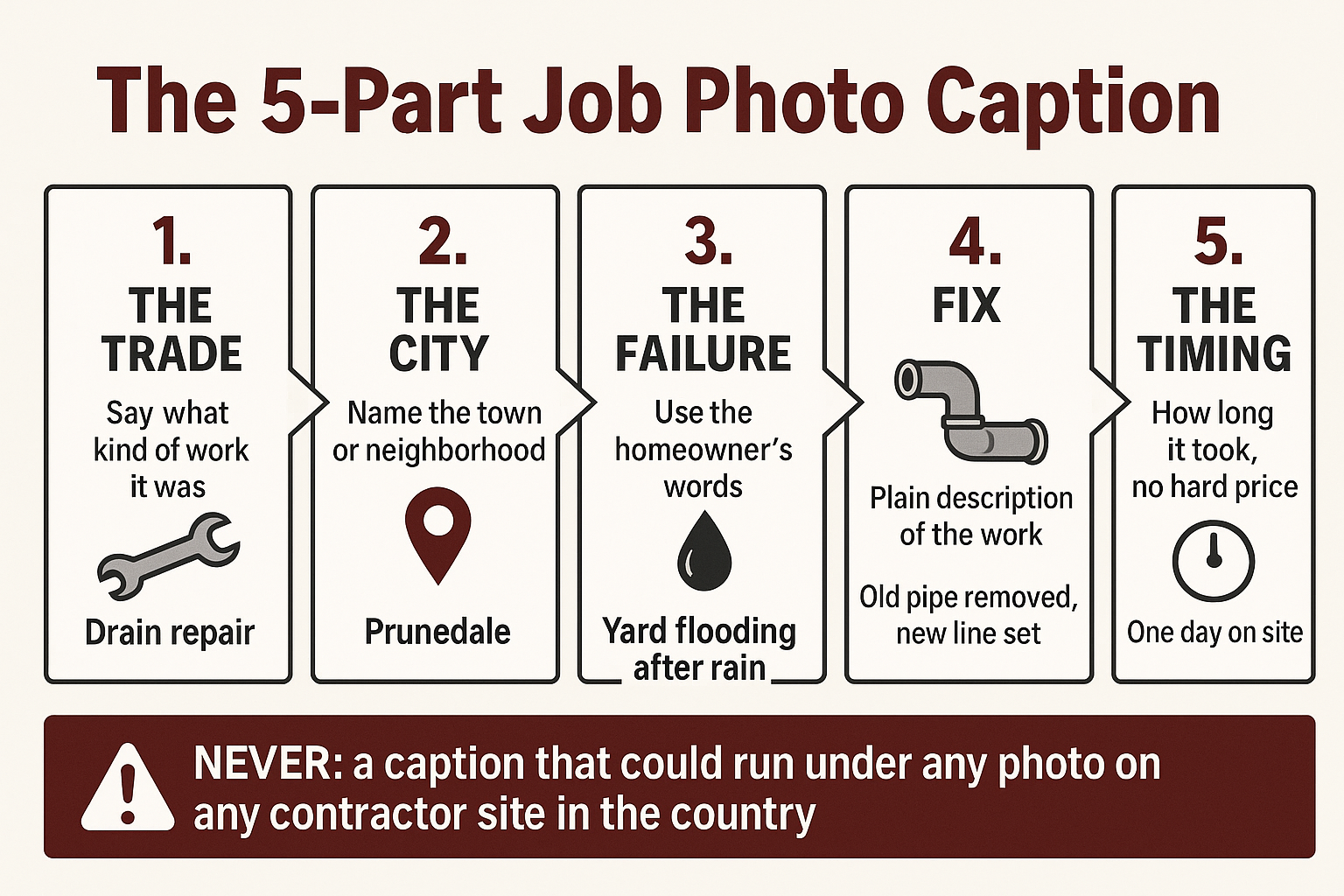
Write the Caption in the Homeowner’s Words, Not the Invoice’s
This is where the search value lives, and it takes about 90 seconds per photo once you get the rhythm.
Name the trade. Name the city or neighborhood. Describe the failure the way the homeowner described it on the phone. Say what the fix involved. Give a rough sense of timing.
What I leave out is a hard price. Job cost swings on access, materials, and scope, and a number posted next to a photo turns into an argument later. If you want to speak to cost, talk about what drives it on that type of job and let the estimate happen on a call.
The language rule matters more than anything else here. A homeowner types “sewage backing up into the shower and tub.” Nobody types “lateral replacement.” One is a search phrase, the other is a line item.
Same with the rest of it:
- “Water coming through the ceiling from upstairs” beats “supply line failure”
- “Hot water only lasts five minutes” beats “undersized unit”
- “Both toilets backed up at the same time” beats “main line obstruction”
And read the caption back before you publish. If it could run under any photo on any contractor site in the country, it is not a caption, it is filler. That is the same test I apply to content already sitting on your site and not working.
Put a Review Line Under the Before and After
Reviews are the only customer source you can quote word for word. Phone calls and form submissions always get paraphrased and stripped of anything identifying, and that is a rule I do not bend.
A drainage customer described an outcome like this, and it reads better than anything I could write for it: “They removed the old broken pipe and replaced it with a new corrugated storm drain pipe… drainage works perfectly now.”
Set that under a before and after pair, unattributed, no customer named. The photos prove the work happened. The review line proves someone was happy about it. Between the two, a homeowner has what they came for.
Review wording carries weight with answer engines too, which I get into in the review wording that gets a contractor named in AI answers and in how three customer sources map to three different SEO jobs.
What Never Gets Published, and When to Publish the Rest
This is where owners stall out, so let me make it simple. Keep these out of frame or crop them before anything goes live:
- House numbers and street signs
- Gate codes and alarm panels
- Mail, packages, and paperwork
- License plates and customer vehicles
- Family photos and identifiable interiors
For any residential interior shot, get a quick verbal okay from the homeowner. It takes ten seconds and it has never once been a problem in my experience.
What you do want visible is the professional stuff: proper equipment, crew in gear, a clean and controlled site. Monterey County advises homeowners to use licensed and insured tree services for removals, and notes that trimming vegetation near a river or creek can require permits through the county permit center. A photo showing you handled the site correctly carries weight locally that no headline does.
Then there is timing. Storm damage photos from Watsonville, Prunedale, and the Carmel Valley Road corridor are worth publishing in September and October, ahead of the rain. Not in February, when every homeowner in the county is already searching and the page has no time to rank.
Frequently Asked Questions About Using Job Photos as First Party Data
How many photos do I need before this is worth doing?
You almost certainly have enough already. Ten to fifteen usable photos across three or four problem types is enough to build out real page content. The bottleneck is never volume, it is that nothing is sorted or captioned.
Do phone photos look too rough to put on my website?
No, and the rough look is part of why they work. A slightly gritty trench shot reads as real, and a polished stock image reads as a stock image. Just wipe the lens and shoot in daylight when you can.
Does posting job photos actually help with AI search results?
The photo alone does not do much. The caption around it does, because that text names the trade, the city, and the problem in the words homeowners actually use. Answer engines pull from that language. A gallery with no words gives them nothing to work with.
Should I ask permission before posting a photo of a customer’s house?
For exterior work with no identifying detail visible, most contractors just crop and post. For any interior shot, ask. A quick verbal okay while you are packing up is enough, and homeowners who liked the work almost always say yes.
How often should new photos go up?
For the Google Business Profile, plan on something every week or two so it does not go quiet. For service pages, adding a fresh captioned job every month or so is plenty, and consistency matters more than volume.
A Second Read on What Your Photo Archive Is Worth
We built our approach around evidence a contractor already owns rather than content written from nothing, and all of it stays here on the Central Coast with nothing outsourced overseas. Phil Fisk works directly with a small roster of Monterey County contractors and is available for a discovery call if an owner wants a second read on what is sitting in their camera roll. The office line is (831) 789-9320.