Direct Answer: Sort 60 days of anonymized form submissions into four buckets: problem, urgency, money question, and proof request. Anything repeating three or more times becomes a page or a missing page section.
Most contractors I talk to in Monterey County have the same problem with content. They sit down to write something for the website, stare at a blank page, and end up guessing at a topic that sounds about right.
But the answer is already sitting in your email. Every contact form submission you have received in the last two months is a homeowner telling you, in writing, exactly what they were worried about before they trusted you enough to hit send.
This guide is only about that one channel. Not calls, not reviews, just the typed submissions in your inbox, and how to turn 60 days of them into a content plan in about an hour.
Why Form Submissions Beat Every Other Customer Source for Keyword Work
Forms are the only place a homeowner slows down, types, and edits their own description of the problem. They reread it before sending. That makes the phrasing much closer to what they would type into Google or ChatGPT than anything they would say out loud on a call.
On the phone, people ramble and you interrupt with questions. In a review, they are describing an outcome months after the fact. In a form, they are mid-panic and mid-research at the same time, which is exactly the state someone is in when they search.
The other thing forms give you is the vocabulary gap. Nobody types hydro jetting or tankless recirculation. Here is what actually lands in a Central Coast contractor’s inbox:
- A tree that has “seen better days”
- An insurance carrier threatening to cancel over limbs hanging above the roof
- A request for a written report the city will accept
- “Can I send photos first?” before committing to an on-site visit
- Water coming through a ceiling from the floor above
- A water heater that is a year and a half old and gives five minutes of hot water
Every one of those is a page. None of them use the words on your service menu. That gap between trade vocabulary and homeowner vocabulary is the whole opportunity, and it is the reason your customers have already written your best SEO content.
Step 1: Pull 60 Days and Strip the Personal Details
Open your form notification folder and export or copy the last 60 days of submissions. Two months is enough to see patterns without dragging in seasonal noise from a different part of the year.
Before you do anything else, strip out names, street addresses, phone numbers, and email addresses. You are working with the problem description only. This is private correspondence, and it never gets published as written.
If you get fewer than 20 submissions in 60 days, go back 90 or 120 days instead. You need enough volume that repetition means something.
Step 2: Sort Every Submission Into Four Buckets
This is the part that turns an inbox into a keyword report. Read each submission and pull out up to four things:
- The problem as described. Their words, not yours. “Sewage backing up into the shower” stays as written.
- The urgency or timing signal. Tonight, this weekend, before escrow closes, before the rainy season, whenever you can get out here.
- The money question. Do you charge for an estimate, is this covered, roughly what does this run, will it cost more if you have to open the wall.
- The proof request. Photos, references, license verification, a written report, warranty terms.
One submission can feed two or three buckets. That is fine, and it is useful, because a message that carries both a money question and a proof request tells you those two concerns travel together for that job type.
I use a plain spreadsheet with four columns and one row per submission. No tools, no software. Then I count what repeats.

Step 3: Sort by City Before You Write a Single Word
Here is where contractors lose the most value. The Monterey Bay Area is not one market, and the same trade gets different questions depending on which side of the hill the submission came from.
What I see in this county:
- Carmel and Carmel Valley produce insurance and defensible space questions about trees, plus requests for written documentation.
- Salinas and Watsonville skew toward older housing stock, so plumbing and electrical panel questions show up more, along with more Spanish-language submissions and more photo-first requests.
- King City and south county submissions often lead with whether you will even drive out that far. That is a service area question, not a service question, and answering it on a general page does nothing.
- Monterey, Pacific Grove, and Seaside tend toward smaller-lot access and older construction details.
Sort your four-bucket sheet by city first. If you skip this, you publish one flat page for a region that behaves like four separate markets. If your submissions cluster in towns where you have no address, that is a different problem, and running a service area business online is where to start.
Translating Form Language Into Pages
This is the translation step. Left column is how homeowners write it, middle is what the trade calls it, right is what it becomes on your site.
| What the form says | What the trade calls it | What it becomes on your site |
|---|---|---|
| “Water is coming through the ceiling from upstairs” | Hidden supply line leak | FAQ section on a service page about finding leaks behind drywall |
| “It’s only been a year and a half and the hot water only lasts five minutes” | Undersized or misconfigured water heater | New page: why a newer water heater runs cold |
| “It’s seen better days” | Tree health assessment | New page: how to tell if a tree needs care or removal |
| “My insurance is threatening to cancel” | Clearance pruning | City-specific page for insurance-driven tree work |
| “Can I send photos first?” | Remote estimate | Section on your existing estimate process page |
| “Do you come out this far?” | Service area coverage | City page for the town the submissions came from |
The Hour-Long Version of This Process
The full sequence, from inbox to decision, in five steps.
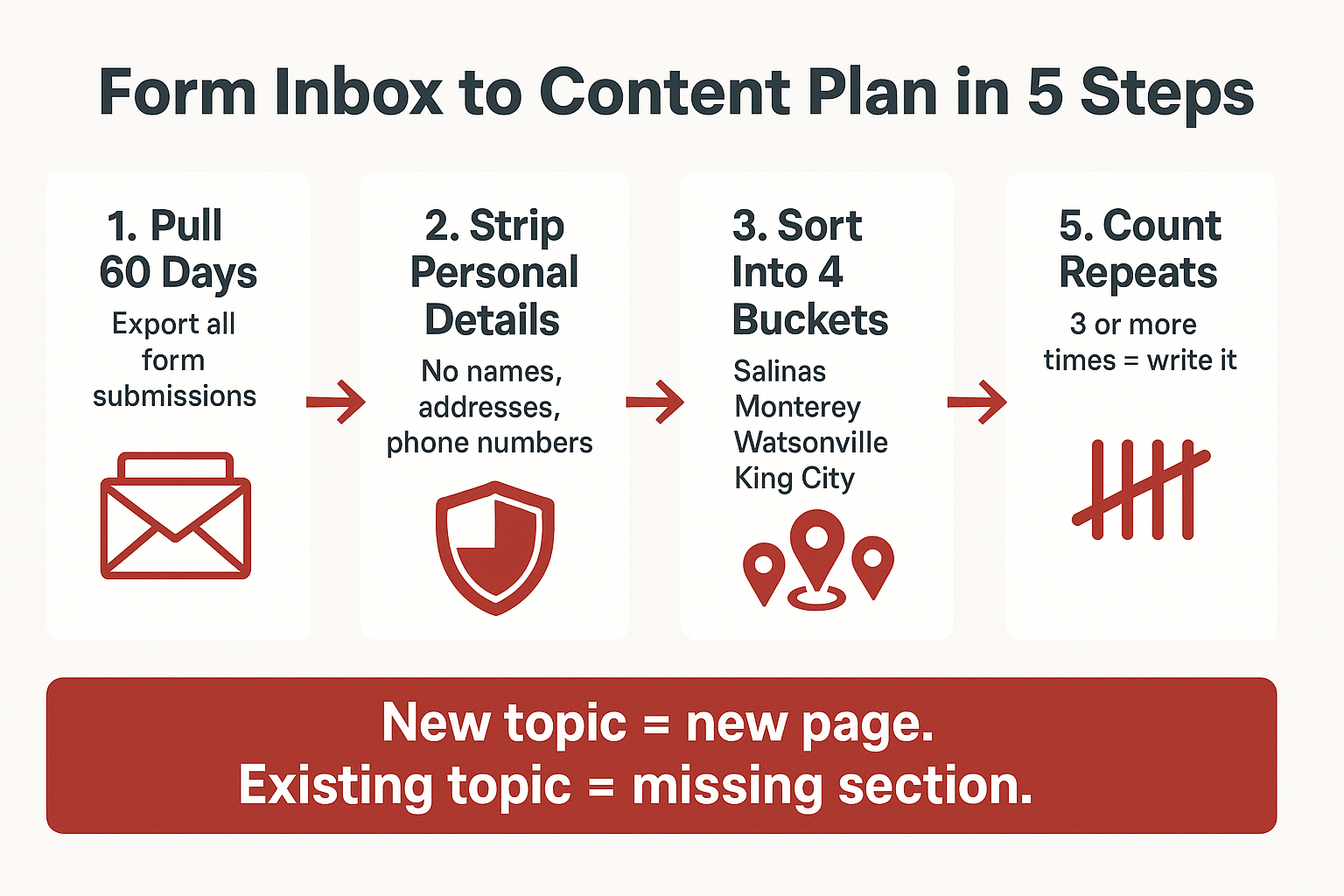
Step 4: Decide If It’s a New Page or a Missing Section
Count the repeats. Anything that shows up three or more times in 60 days is worth writing. But the default move of writing a new blog post every time is wrong, and it is how sites end up with 40 thin pages competing with each other.
Use this test:
- Do you already have a page on that job type? Then the repeated question is a missing section on that page. Add it as an H2 or an FAQ block. Do not build a new URL.
- Is there no page for that job type at all? Then it is a new service page, not a blog post.
- Is it a question about your process rather than a job? Estimates, warranty, timelines, documentation. That belongs on one process page that everything else links to.
- Is it a geography question? That is a city page, and the submission volume tells you which city earns one first.
When you only have bandwidth for a couple of pages a month, this ranking matters more than the writing itself. I have written about which pages to write first when time is the constraint.
Step 5: Understand Why This Maps to AI Answers
Straight service-plus-city searches like “plumber Salinas” still behave like a classic map pack search. Local search studies have found AI Overviews appear on roughly 40% of local business searches overall, but they show up far more often on reason and informational questions than on commercial ones, with one measurement putting reason queries near 60% against roughly 17% for commercial searches.
Look back at your four buckets. Cost, urgency, repair versus replace, warranty, documentation. Those are almost entirely the hybrid, informational questions where AI answers dominate.
That is why the inbox maps so cleanly onto the content that gets cited. It is also the reason our AI Search Sync work starts with real customer language instead of a keyword tool, and why customer data splits into three separate jobs rather than one.
Step 6: Keep Private Messages Private, and Use Reviews as the Public Proof
Form submissions and phone calls always get paraphrased and anonymized. No exceptions, no “but they wouldn’t mind.” You are pulling themes and phrasing, not publishing correspondence.
Reviews are the only customer source you can quote word for word, which makes cross-checking the two worth the effort. If your forms show people worried about ceiling damage, and a review describes that exact rescue, you have both halves: the form data is your private roadmap, the review is your public evidence.
One anonymized review of a Central Coast home service company reads: “The leaks were so bad water was dripping from the ceiling into the kitchen and dining room. They were able to find the problem and fix it.” That sentence belongs on the page your form data told you to write.
What Happens If You Hand This Job to a Topic Generator Instead
Google allows AI-assisted content, but its spam policies treat scaled pages that add no value as spam, and the 2026 policy language covers attempts to manipulate generative AI responses.
A page built from your own form submissions survives that test for a simple reason: no competitor has your inbox. The phrasing, the city mix, the specific worries are yours.
A page built from a generated topic list says what any competitor could say, in roughly the same words, with nothing underneath it. That is the difference between a growing site and automated content that quietly costs you rankings.
Frequently Asked Questions About Using Form Submissions for SEO Content
How many form submissions do I need before this is worth doing?
About 20 usable submissions is the floor. Below that, go back further in time rather than working from a smaller sample, because two mentions of the same thing could be coincidence.
Can I just copy a homeowner’s exact wording onto my website?
No. Paraphrase it. You can absolutely match the vocabulary they used, like “seen better days” instead of “declining tree health,” but never reproduce a submission as a quote or include anything that could identify the person.
What if most of my submissions are just “please call me”?
That is a form design problem, not a data problem. A single open field asking what is going on, with no character limit, gets you far more usable language than a dropdown menu of services you already know you offer.
How often should I run this?
Monthly beats annually by a wide margin. A one-time audit gives you a topic list that is stale in a quarter, while a standing monthly read catches shifts, like the tree and drainage questions that pick up before the rainy season in Monterey County.
Should I do this with my phone calls too?
Yes, but treat it as a separate pass with a different purpose. Calls surface objections and hesitation better than forms do, while forms give you the typed phrasing that matches search behavior.
Want a second read on what your own inbox is telling you?
We work with contractors across Salinas, Monterey, Watsonville, and Hollister, and we read call transcripts and form submissions as a standing monthly input rather than a one-time audit, with each report ending in three prioritized action items. Phil Fisk handles a small roster of Central Coast contractor clients directly, and a 30 minute discovery call is open to owners who want another set of eyes on their own form data. The office line is (831) 789-9320.