
When you get a fake or malicious Google review, your first instinct is probably frustration. The good news is you can turn that frustration into action. Learning how to dispute a review on google starts by flagging it directly from your Google Business Profile or Google Maps. You'll need to select a specific policy violation and then submit it to Google's moderation team. This is the first and most critical step in protecting your business's hard-earned reputation.
Why You Can't Afford to Ignore Fake Reviews

Imagine a popular Santa Cruz surf shop getting a one-star review claiming their services are terrible—from someone who has clearly never set foot in the store. It's a maddeningly common scenario for businesses all over Monterey County.
Fighting back against this kind of feedback isn't just about pride; it's a non-negotiable business strategy.
Protecting Your Digital Curb Appeal
Your Google Business Profile is often the very first impression a potential customer has of your business. A string of negative or suspicious reviews can send people running before they even think about visiting your website or walking through your door.
Taking swift action shows that you actively manage your online presence and are committed to authentic customer feedback. And in a world where 73% of all online reviews live on Google, this matters. Research also shows that 81% of consumers read Google reviews before they decide to engage with a local business, making it the most influential platform out there.
The Impact on Local SEO
Your overall star rating and the sheer number of reviews you have are massive factors in local search rankings. A sudden flood of fake one-star reviews can tank your visibility in the local map pack, making it harder for customers in Salinas or Carmel-by-the-Sea to even find you.
Disputing these reviews helps maintain the integrity of the rating you’ve worked so hard to build.
By learning how to dispute a review on Google, you take back control of your online narrative. It sends a clear signal to both Google's algorithm and potential customers that you are dedicated to maintaining an honest and trustworthy reputation.
While disputing a review is a crucial behind-the-scenes move, it’s just as important to know how to respond publicly. A calm, professional reply can do wonders to mitigate the damage while you wait for Google’s decision. For a deep dive into that, check out our guide packed with strategies that can help turn a bad situation into a win for your business.
Knowing When You Can Flag a Review for Removal

Before we jump into the how, we need to cover the when. The reality is, not every negative review is eligible for removal. A customer in Monterey County who had a genuinely bad experience has every right to share that, even if it’s tough to read.
Google’s takedown process is built around its specific content policies. You can’t just flag a review because you disagree with it or feel it’s unfair. The secret to getting a review taken down is to pinpoint a clear, undeniable policy violation before you even think about hitting that report button.
Common Policy Violations to Look For
Think about the most common bogus reviews you see. Maybe it’s a spam review hitting a popular Carmel-by-the-Sea art gallery, or a disgruntled ex-employee trying to damage a Salinas ag-tech firm’s reputation. These are classic examples of reviews that break the rules.
Here are the most common violations to keep an eye out for:
- Conflict of Interest: Reviews from current or former employees are a huge no-go. The same goes for sneaky competitors trying to tank your rating.
- Spam and Fake Content: This is a big one. It covers everything from reviews posted by bots, content from multiple fake accounts, or anything that’s clearly not based on a real customer experience.
- Off-Topic Content: A review must be about a customer's experience with your business. Rants about politics, social commentary, or personal grievances don't belong and are removable.
- Hate Speech or Harassment: Any content that is discriminatory, threatening, or launches personal attacks against an individual is a serious violation that Google acts on quickly.
To make it easier, here's a quick reference table to help you decide if a review is worth disputing.
Valid vs. Invalid Reasons for Disputing a Google Review
| Violation Type (Valid for Dispute) | Example Scenario | What Doesn't Qualify (Invalid for Dispute) |
|---|---|---|
| Spam/Fake Content | A user leaves the same 1-star review on 10 unrelated businesses in an hour. | A customer leaves a short, vague review like "Didn't like it." |
| Conflict of Interest | A recently fired employee leaves a scathing review about management. | A customer's family member leaves a negative review about their experience. |
| Hate Speech/Harassment | The review uses racial slurs or personally attacks a specific employee's appearance. | A customer expresses strong anger, saying "The service was terrible!" |
| Off-Topic | The reviewer complains about the lack of parking on the street, not your actual business. | A customer complains about your prices being too high. |
| Impersonation | Someone creates a profile pretending to be a local celebrity to leave a fake review. | A customer uses a pseudonym or nickname as their profile name. |
This table should help you quickly vet reviews and focus your energy on the ones that actually violate the rules, increasing your odds of a successful removal.
Mastering these distinctions is the single most important part of this entire process. A successful removal request isn't about arguing your side of the story; it's about handing Google clear proof that one of their rules was broken.
Building this knowledge is a cornerstone of protecting your brand online. For more strategies on taking a proactive approach, check out our guide on online reputation management tips, which offers broader tactics for businesses across the Monterey Bay area.
The Right Way to Report a Google Review
So, you're ready to take action. This is your practical, no-nonsense guide to flagging a review that's crossed the line. Knowing how to dispute a review is one thing; doing it the right way is what actually gets results.
The process itself is pretty straightforward, but the details are what make or break your case. You can report reviews directly from your Google Business Profile or from Google Maps, but we're going to focus on the quickest, most direct method.
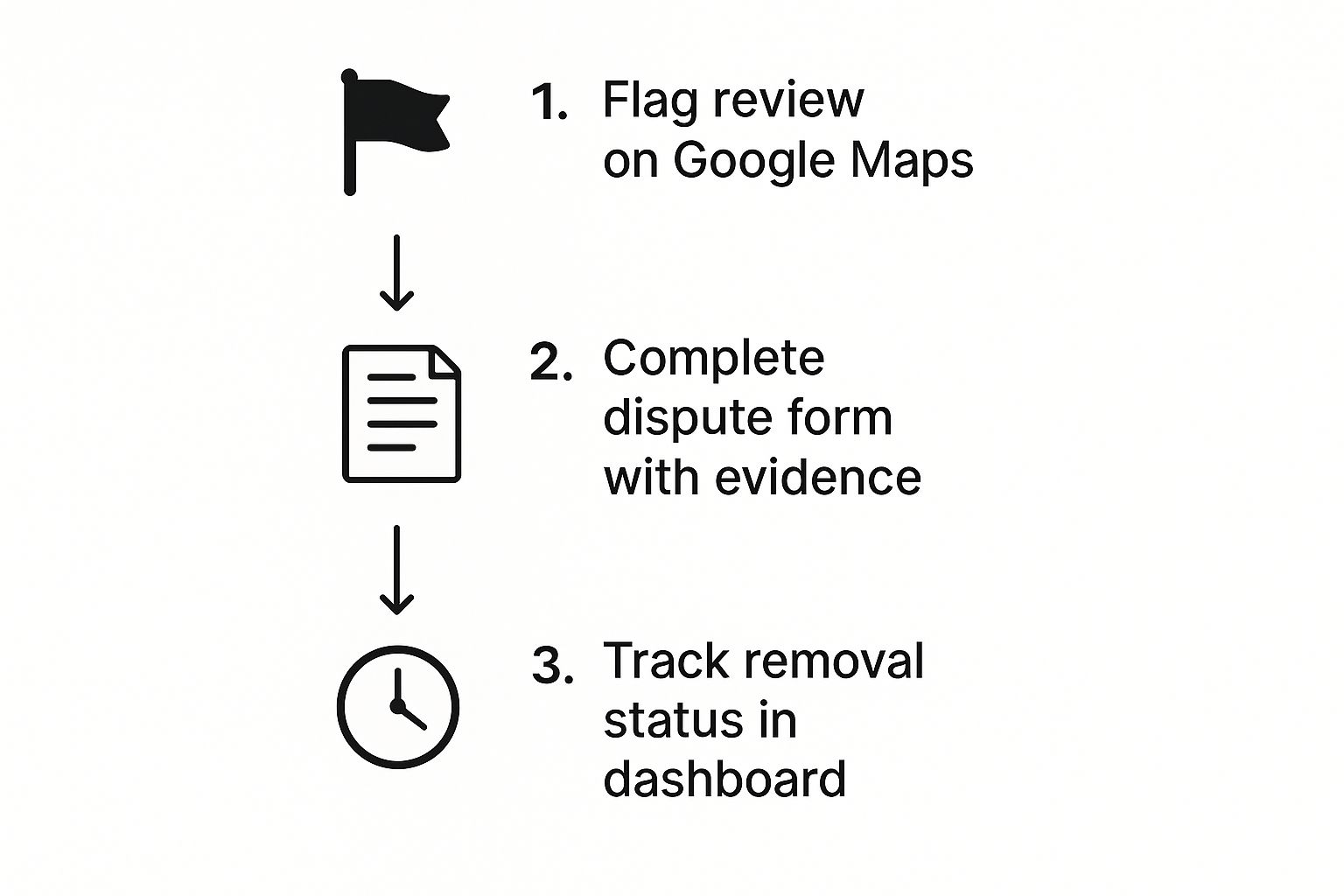
Following this workflow ensures you give Google exactly what it needs, in the right order. That’s the key to getting a faster resolution.
The Step-by-Step Flagging Process
Let’s walk through exactly how to report that problematic review from your business profile.
-
Find the Review: First, log in to the Google account that manages your business. Search for your business name on Google to pull up your dashboard, and then click on "Reviews."
-
Pinpoint the Problem: Scroll through the list to find the specific review you need to dispute. Sorting by "Lowest rating" can save you a lot of time here.
-
Start the Report: To the right of the review, click the three little dots (the menu icon). A small menu will pop up—choose “Report review.”
-
State Your Case: This is the most important step. A new window will appear asking you to select a reason for your report. Be precise. Choose the policy violation that most accurately describes the issue, based on the types we covered earlier.
-
Submit and Wait: Once you’ve picked the violation, hit submit. You should get an email confirmation from Google acknowledging your report, usually within a day or so.
Pro Tip: When you report the review, stay objective. This isn't the place to get emotional or tell your side of the story. Stick to the facts. Just select the policy violation, like "This content is spam" or "This review contains hate speech." The clearer you are, the better your chances.
Dealing with fake reviews is a real battle for business owners, and customers are catching on. In fact, roughly 50% of consumers worldwide believe they've spotted fake reviews on Google. The biggest red flags for them? Over-the-top praise (45%), seeing the same phrases used in multiple reviews (40%), and anonymous profiles (38%).
You can dive deeper into these review statistics and see how they're impacting businesses across San Benito County. This data is exactly why flagging genuinely fake or inappropriate content is so crucial—it protects the trust you’ve built with your actual customers.
What Happens When Your Dispute Is Denied? Good Question.
It’s a moment every business owner in Santa Cruz County dreads. You report a review that clearly violates policy, wait a few days, and then get that generic email: "We did not find a violation of our policies."
Don't give up. Seriously. That first denial is almost always an automated decision spit out by an algorithm. Your real fight starts now, and your next step is to appeal for a manual review from an actual human.
This is your chance to build a much stronger case. It's not about arguing or complaining about fairness; it’s about methodically proving a specific policy was broken.
The first denial is not the final word. It's an invitation to escalate your case with better evidence and a more detailed explanation. Think of it as moving from an automated gatekeeper to a real person who can apply context.
Building Your Appeal: Time for Round Two
When that initial dispute gets shot down, Google gives you the option to appeal. You can find this right inside your Google Business Profile’s “Manage reviews” dashboard. Just find the review, check its status, and you should see a shiny "Appeal" button.
This is where you provide the context the algorithm missed. You have to explain why the review violates a specific policy, and you need to be direct.
Here's what I always recommend including:
- Cite the Specific Policy: Don’t just say it’s “fake.” State the exact policy violation. For example: “This review is a conflict of interest as it was posted by a former employee terminated last month.”
- Bring the Receipts: Attach any proof you have. This is critical. Screenshots of an ex-employee's social media posts, an email where a customer is trying to extort a discount, or your own CRM records proving the person was never a client—it all works.
- Keep it Short and Factual: No emotion. Just the facts. Lay out your evidence clearly and concisely.
The Power of a Public Response (Don't Skip This)
While you're working on the back-end appeal, you absolutely have to post a professional, public reply to the review. This is non-negotiable. It shows potential customers that you’re engaged and proactive, even when facing unfair criticism.
Your response can also subtly provide context that hints the review isn't legitimate, which is a powerful tool for managing your reputation on the fly. Honestly, a well-crafted reply can be just as important for generating leads for home service businesses as getting the review removed.
Remember, your response is permanent. It's your chance to have the last word.
Building a Reputation That Resists Negative Reviews
Dealing with a fake review is purely reactive. The real power move is building an online reputation so strong that one bad apple doesn't spoil the bunch. While knowing how to dispute a review on google is a vital skill, the best long-term strategy—especially for businesses in places like Pacific Grove and Marina—is to generate a steady stream of positive, authentic feedback.
Think of it as building a defensive wall around your brand. A proactive strategy flips the script from damage control to reputation building. The goal is simple: get your happy customers, who are often the silent majority, to share their great experiences. Doing this drowns out the noise from the occasional negative or fraudulent comment and solidifies your digital footprint across Monterey County.
Make Asking for Reviews a Habit
The fastest way to get more positive feedback is often the easiest: just ask for it. You don't have to make it a chore, either. Automating the process makes it a seamless part of your workflow.
- Email & SMS Requests: Once a job is wrapped up, an automated message thanking the customer with a direct link to your Google review page is incredibly effective. The easier you make it, the more likely they are to do it.
- On-Site Reminders: For businesses with a physical location, a small sign or a QR code at the checkout counter can work wonders without being pushy.
- Personal Follow-Up: A quick, personal call from a business owner in Salinas can be a game-changer, especially for high-value clients. That personal touch goes a long way.
To really dig into the broader scope of protecting your brand's online image, you can explore comprehensive online reputation management strategies. These tactics are a perfect complement to your review generation efforts.
Engage with Every Single Review
Responding to all your reviews—both the glowing ones and the critical ones—is non-negotiable. It shows you're paying attention and that you actually care about customer feedback. It's shocking, but only about 5% of businesses actively respond to their online reviews. This leaves a massive opportunity for you to stand out from the competition.
And since 87% of customers still consider doing business with companies rated between 3 and 4 stars, your public responses are your chance to build trust and show you’re accountable.
A proactive review strategy is your best defense. A consistent flow of positive feedback makes any single negative review less impactful, protecting your hard-earned reputation and boosting your local SEO.
This whole process is a fundamental piece of a healthy digital marketing plan. For a deeper look into how this applies specifically to trade businesses, our guide on reputation management for home services offers more targeted advice.
Got Questions About Disputing Google Reviews? We Have Answers.
When it comes to disputing a bogus Google review, most business owners have the same handful of questions pop up. Whether you're in Salinas or Santa Cruz, getting clear answers is the first step to handling the process confidently.
Here are the straightforward responses to the questions we hear most often.
How Long Does Google Take to Remove a Review?
This is the million-dollar question, and the answer is… it depends. You have to be patient.
Some reviews that are obviously spam or bots might get zapped automatically within a few hours. But if your flagged review needs a real person at Google to look it over, you could be waiting several days or even a couple of weeks. If your initial request gets denied and you have to appeal, that clock starts all over again.
Bottom line: There's no guaranteed timeframe. Your best move is to post a public reply while you wait for Google's decision.
Should I Respond to a Review I Already Flagged?
Yes, absolutely. A calm, professional response shows every potential customer scrolling through your profile that you're on top of your business—even when you're dealing with what you believe is a fake or unfair comment.
Think of it as controlling the narrative for anyone in Monterey County who might be weighing their options.
If Google decides not to remove the review, your public reply is the only thing that adds context for future customers. It’s a vital part of managing your online reputation. As we've covered before, the impact of online reviews on home service businesses is massive, and every single interaction matters.
Will Flagging Too Many Reviews Hurt My Profile?
Nope. There's zero evidence to suggest that flagging reviews—even if you do it often—negatively impacts your Google Business Profile ranking. Google actually wants you to report content that violates its policies. It helps them keep the platform clean.
That said, only flag reviews that genuinely break the rules. If you start spamming the "report" button on every single negative comment just because you don't like it, you risk having your reports taken less seriously down the road. Use the tool wisely.
Managing your online reputation is a constant effort, but you don't have to do it alone. If you're a local business owner looking for an SEO agency in Salinas or digital marketing for Santa Cruz retailers, we can help build a powerful digital presence that drives real results.
By Phil Fisk, CEO, Core6 Marketing
Phil Fisk is the CEO of Core6 Marketing, a digital marketing agency dedicated to helping businesses throughout the Monterey Bay Area grow. With a focus on measurable results and a passion for our local economy, Phil and his team provide actionable marketing strategies that connect businesses with their customers.
Core6 Marketing
1628 N. Main St #263, Salinas, CA 93906
831-789-9320
[email protected]
https://core6.marketing/