
For a small business owner in the Monterey Bay Area, launching a new website is a major milestone. From the bustling home service contractors in Santa Cruz to the agricultural leaders in Salinas, a strong digital presence is non-negotiable for capturing local market share and driving growth. A successful launch, however, is far more than just flipping a switch and hoping for the best. This comprehensive website launch checklist is your blueprint to ensure your investment generates qualified leads, boosts your local visibility, and delivers a measurable Return on Investment (ROI) from day one.
Think of it as building a house: you wouldn't move in before the plumbing, electrical, and structural inspections are complete. Similarly, your website needs a thorough pre-launch inspection to prevent costly errors and missed opportunities. Overlooking a single detail can lead to broken contact forms, poor search rankings, or a frustrating user experience that sends potential customers in Monterey County straight to your competitors.
This checklist is your step-by-step guide, designed for our unique coastal economy. We will guide you through every critical task, from technical quality assurance and performance optimization to final content reviews and security protocols. Let's make sure your digital debut is a flawless one.
Did You Know? The Monterey Bay is home to one of the world's deepest submarine canyons, reaching depths over two miles. Just as you can't see the canyon's full depth from the surface, you can't see all the critical behind-the-scenes work that makes a website successful.
1. Pre-Launch Quality Assurance Testing
Before your new website greets its first visitor from Santa Cruz or Hollister, it must be flawless. Comprehensive Quality Assurance (QA) testing is the critical final review in any professional website launch checklist. This involves a deep dive into every link, form, button, and user pathway on every conceivable device and browser. This isn't just about preventing bugs; it's about guaranteeing a seamless experience that builds trust with your Monterey County clientele from their very first click.
A buggy launch can immediately tarnish your brand's reputation and send potential customers straight to your competitors. Meticulous QA ensures your digital storefront is polished, professional, and ready for business.
Why Pre-Launch QA is Non-Negotiable
Think of your website as your business’s digital front door. A broken link is like a jammed lock, and a non-functional contact form is like an unmanned reception desk. These small failures create friction and signal a lack of professionalism, which is especially damaging for businesses who rely on building immediate trust.
Real-World Scenarios:
- E-commerce Functionality: A Gilroy-based winery testing its new checkout process on mobile to ensure a smooth purchase experience for locals and tourists.
- Interactive Elements: A Santa Cruz surf shop verifying that its interactive wave-forecast widget works perfectly on both Safari for Mac and Chrome for Android.
- User Experience (UX): A Salinas law firm asking a non-technical staff member to test its contact form to ensure the user experience is intuitive and simple.
A Three-Step QA Workflow
To streamline your testing, we've outlined a simple three-step process that covers the most critical aspects of user experience before launch.
This infographic outlines a foundational process flow for pre-launch QA, covering compatibility, responsiveness, and functionality.
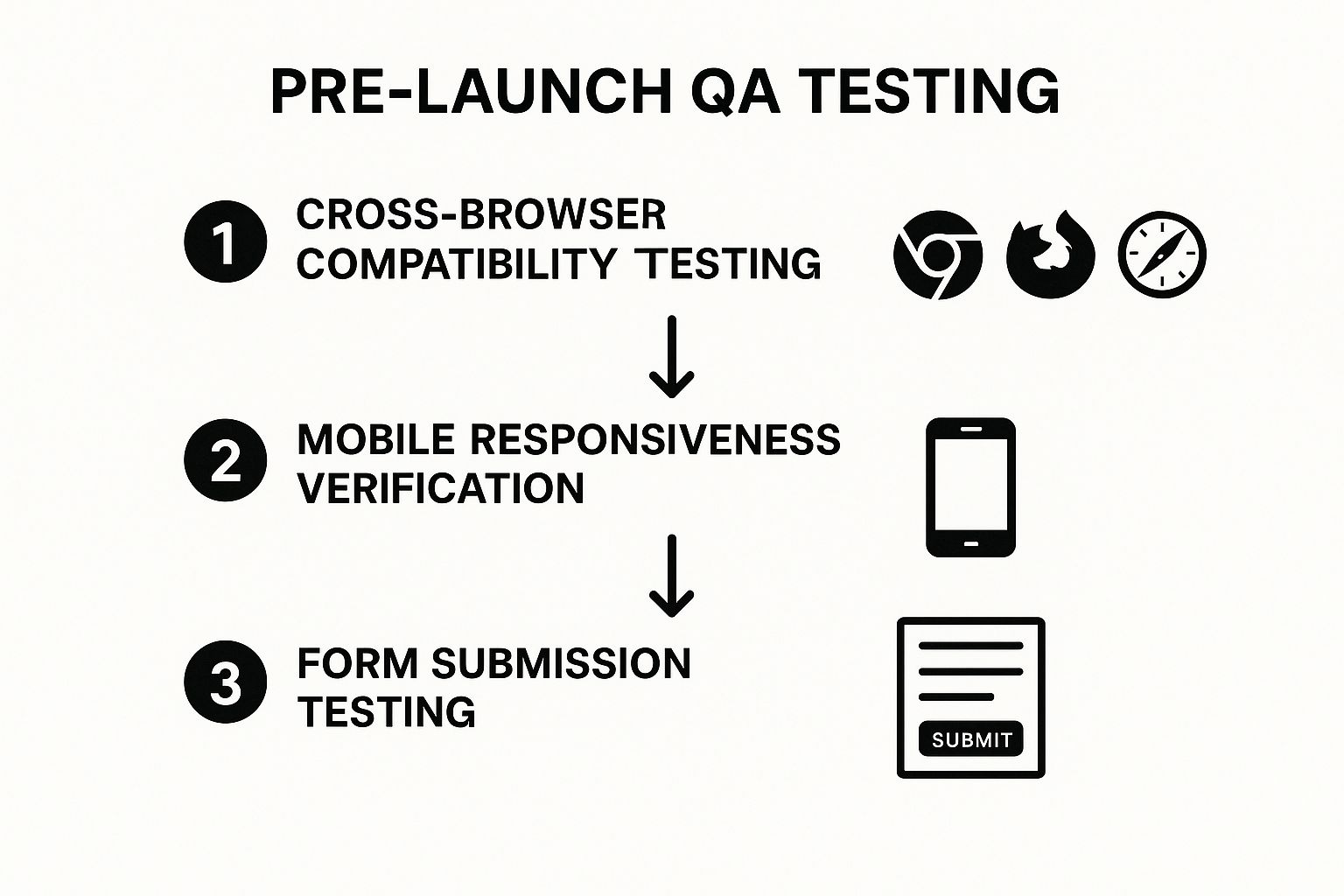
Following this sequence ensures that from a technical and user-facing perspective, your site delivers a consistent, reliable experience no matter how a visitor accesses it.
Actionable Testing Tips:
- Use Testing Tools: Leverage platforms like BrowserStack for efficient cross-browser testing without needing dozens of physical devices.
- Create a Checklist: Map out every critical user journey, from homepage to contact submission, and test each one methodically.
- Test on Real Devices: Always test on actual mobile phones and tablets, not just the developer emulators in your browser. Real-world conditions can reveal unique bugs.
- Get a Fresh Perspective: Ask someone completely unfamiliar with the project to navigate the site. They will spot usability issues you've become blind to.
By dedicating time to this crucial step, you can launch with confidence. For a deeper look into the standards that define a successful site, explore these insights on professional website design.
2. Your Pre-Launch Website Launch Checklist for Local SEO
Before your new site goes live in Monterey County, it needs a solid foundation to be found by customers searching on Google. Search Engine Optimization (SEO) is a non-negotiable step in any professional website launch checklist. This involves configuring essential elements like meta titles, descriptions, image alt text, and XML sitemaps. It ensures that from day one, search engines can efficiently crawl, understand, and index your website, making it visible to potential clients from Salinas to Santa Cruz.

Launching without foundational SEO is like opening a shop on a back alley with no sign. You could have the best services in the Monterey Bay Area, but if no one can find you online, your digital presence won't generate leads. A proper SEO setup builds the digital roads that guide customers directly to your business.
Why Foundational SEO is Non-Negotiable
Think of SEO as the language you use to communicate with Google. Your meta title is the first impression, your sitemap is the map you hand to the crawler, and structured data helps it understand exactly what your services are. For a Hollister-based HVAC contractor, this means showing up when a local homeowner searches "emergency AC repair near me," not just when someone types in your brand name.
Real-World Scenarios:
- Meta Tag Optimization: A plumbing company in Gilroy writes a compelling meta description for its "water heater installation" page to increase click-through rates from local search results.
- XML Sitemap Submission: A Carmel-by-the-Sea art gallery submits its sitemap to Google Search Console to ensure all its new artist pages are discovered and indexed quickly.
- Structured Data Implementation: A Watsonville roofing contractor uses Schema markup to highlight its business hours, service area, and customer reviews directly in search results.
A Three-Step SEO Setup Workflow
To ensure your website is ready for search engines, we recommend a focused three-step process. This workflow covers the most critical on-page and technical SEO elements needed for a successful launch.
This process ensures your site is technically sound, content is optimized, and you have the tools to measure performance from the moment you launch.
Actionable SEO Tips:
- Focus on Local Keywords: Instead of targeting broad terms like "electrician," a business should target specific, local phrases. A good example is "digital marketing for Santa Cruz retailers."
- Optimize for Mobile-First: Google primarily uses the mobile version of a site for indexing and ranking. Ensure your site is fully functional and easy to navigate on a phone.
- Set Up Analytics Tools: Configure Google Search Console and Google Analytics 4 (GA4) before launch. Submit your XML sitemap through Search Console to kickstart the indexing process.
- Write Compelling Meta Tags: Your title and description are your sales pitch in the search results. Make them clear, concise, and compelling to encourage clicks.
Properly configuring your SEO from the start is an investment in your long-term visibility. For a closer look at how metadata impacts your search performance, you can explore the details of how SEO metadata affects your rankings on core6.marketing.
3. Performance and Speed Optimization
In today's fast-paced digital world, a visitor's patience is measured in milliseconds. Performance and speed optimization is a non-negotiable step in any modern website launch checklist, ensuring your site loads almost instantly. This process involves compressing images, minifying code, leveraging browser caching, and using a Content Delivery Network (CDN) to deliver assets quickly, no matter where a customer is located in Monterey County. A slow website doesn't just frustrate users; it actively drives them away and hurts your search engine rankings.

For a contractor in Salinas, a fast-loading site means a potential customer can quickly find your emergency contact number instead of bouncing to a competitor. A speedy site directly correlates with higher engagement, better user experience, and increased conversions.
Why Speed is a Conversion Driver
Think of your website's speed as the first impression of your customer service. A fast, responsive site tells a visitor from Santa Cruz that you are efficient, professional, and value their time. This is backed by hard data. According to Google, the probability of a user leaving a site increases by 32% as page load time goes from 1 second to 3 seconds.
Real-World Scenarios:
- E-commerce Impact: A local boutique in Carmel-by-the-Sea knows that every second of load time saved can lead to a direct increase in online sales.
- Lead Generation Gains: A Marina-based service business ensures its mobile site loads instantly, capturing leads from users on the go who won't wait for a slow page.
- Engagement Boost: Fast load times encourage users to explore more pages, increasing their engagement and the likelihood they'll contact you.
A Three-Step Optimization Workflow
To ensure your website is lightning-fast from day one, focus on three core areas: asset optimization, delivery enhancement, and performance measurement. This systematic approach tackles the most common culprits of a slow website.
This workflow ensures that your site's foundation is built for speed, from the individual files to how they are served to a visitor's browser.
Actionable Optimization Tips:
- Aim for Green Vitals: Use Google PageSpeed Insights to test your site and strive for "Good" scores across all Core Web Vitals metrics.
- Compress and Convert Images: Use tools to compress your images without losing quality and convert them to modern formats like WebP for faster loading.
- Implement Caching: Configure browser and server-side caching so returning visitors from Hollister or Pacific Grove experience near-instant load times.
- Use a Content Delivery Network (CDN): A CDN stores copies of your site in multiple locations, ensuring fast delivery for every user.
- Minify Code: Reduce the file size of your HTML, CSS, and JavaScript by removing unnecessary characters and spaces.
By prioritizing performance, you ensure your new website not only looks great but delivers a superior user experience that turns visitors into loyal customers.
4. Security Implementation and SSL Setup
In today's digital landscape, a secure website isn't optional; it's a fundamental requirement. Establishing robust security, including an SSL certificate, is a cornerstone of any professional website launch checklist. This process protects sensitive data shared between your customers and your server, building the trust essential for any Monterey County business, from a Hollister plumber to a Santa Cruz retailer.
A secure site (indicated by "https://" and a padlock icon) reassures visitors that their information is safe. Google also prioritizes secure websites in search rankings, making SSL a critical factor for both user trust and SEO visibility. Neglecting security can expose your business and your clients to significant risks.
Why Website Security is Non-Negotiable
Think of an SSL certificate as the digital equivalent of a secure, sealed envelope for online communications. Without it, any data—like contact form submissions or payment details—can be intercepted. For local businesses who handle personal client information daily, a security breach could irreparably damage their reputation across the Monterey Bay Area.
Real-World Scenarios:
- Protecting Client Data: A Salinas-based HVAC company ensures its online booking form is encrypted with SSL to protect client addresses and contact details from potential threats.
- Boosting SEO Rankings: A Gilroy roofing contractor installs an SSL certificate, helping their new website rank higher in local search results for competitive keywords.
- Building Trust: A Carmel-by-the-Sea boutique hotel uses a premium SSL certificate to give international tourists confidence when booking reservations directly on their site.
A Three-Step Security Workflow
To properly secure your website before launch, a methodical approach is best. This workflow focuses on encrypting data, hardening your site against common attacks, and establishing a recovery plan.
- Install an SSL Certificate: This is the first and most crucial step. It encrypts all data transmitted to and from your website.
- Harden Your Website: Implement additional security measures like strong passwords, user role limitations, and security plugins to prevent unauthorized access.
- Set Up Backups: Schedule regular, automated backups of your website files and database. This ensures you can quickly restore your site if a security incident occurs.
Following this sequence creates multiple layers of protection, safeguarding your digital assets and your customers' trust from day one.
Actionable Security Tips:
- Use Free and Reliable SSL: For most small businesses, a free SSL certificate from Let's Encrypt provides strong, sufficient encryption and is supported by most modern hosting providers.
- Implement Security Headers: Ask your developer to add HTTP security headers like a Content Security Policy (CSP) to prevent common attacks like cross-site scripting (XSS).
- Keep Everything Updated: Regularly update your website's core software (like WordPress), themes, and plugins to patch security vulnerabilities as they are discovered.
- Choose Secure Hosting: Select a hosting provider that offers built-in security features such as firewalls, malware scanning, and proactive monitoring.
By prioritizing security, you launch a website that is not only functional but also a safe environment for your customers. For more on protecting your digital assets, learn more about how to protect yourself from scam domain name renewal companies.
5. Analytics and Tracking Configuration
Launching a new website without analytics is like opening a store in Santa Cruz with the doors and windows blacked out. You have no idea who is visiting, what they're looking at, or why they leave. Setting up analytics and tracking is a foundational step in any professional website launch checklist, transforming guesswork into data-driven strategy from day one. It involves implementing tools like Google Analytics 4 (GA4) to measure traffic, user behavior, and the achievement of your business goals.
For businesses in Monterey County, this data is gold. It reveals which services are most popular, which pages are converting leads, and where your digital marketing efforts are paying off. Without it, you're flying blind, unable to make informed decisions to grow your business online.
Why Analytics Setup is Non-Negotiable
Data provides the "why" behind your website's performance. Is your new "Request a Quote" page for Hollister clients working effectively? Are visitors from Salinas finding your emergency services page? Analytics answers these questions, allowing you to optimize your site for better user experience and higher conversion rates. This isn't just about counting visitors; it's about understanding their journey and improving it.
Real-World Scenarios:
- Conversion Tracking: A Carmel-by-the-Sea contractor sets up a goal in GA4 to track every time a user submits their "Schedule a Repair" form, measuring the true ROI of their site.
- User Behavior Analysis: A roofing company in Watsonville uses heat mapping tools to see where users are clicking on their homepage, revealing that a key service isn't getting enough attention.
- Event Tracking: A Gilroy-based electrician tracks clicks on their phone number and email links to understand how many direct leads are generated from mobile visitors.
A Three-Step Analytics Workflow
To ensure you capture meaningful data from the moment your site goes live, follow this streamlined setup process. This sequence covers the essential layers of modern website analytics, from initial setup to specific goal measurement.
This process ensures you start with a solid foundation, manage your tracking efficiently, and focus on the metrics that directly impact your business objectives.
Actionable Tracking Tips:
- Set Goals Before Launch: Define what a "conversion" means for you (form fill, phone call, etc.) and configure these goals in your analytics platform before you go live to capture a complete data set.
- Use Google Tag Manager (GTM): Implement GTM to manage all your tracking scripts (GA4, ad pixels, etc.) from one dashboard. This simplifies updates and reduces reliance on a developer.
- Focus on Business Objectives: Don't get lost in vanity metrics like page views. Focus on key performance indicators (KPIs) like conversion rate, cost per lead, and user engagement on service pages.
- Ensure Privacy Compliance: Make sure your tracking methods are compliant with regulations like GDPR and CCPA by implementing a cookie consent banner and having a clear privacy policy.
Properly configured analytics are crucial for making smart, data-backed decisions. Discover more about how to leverage this data with these insights on marketing analytics and reporting.
6. Content Review and Legal Compliance
Before your website goes live for customers in Monterey County, the content must be accurate, polished, and legally sound. A thorough content review and legal compliance check is an indispensable part of any professional website launch checklist. This step involves scrutinizing all text, images, and legal documents like Privacy Policies and Terms of Service to ensure they are correct, brand-aligned, and meet regulatory standards.
Overlooking legal details can lead to significant fines and damage your brand’s credibility. Ensuring your site is compliant from day one protects your business and builds trust with your local Salinas and Santa Cruz clientele.
Why Content and Legal Review is Non-Negotiable
Think of your website's content as a binding promise to your customers. An inaccurate service description is a broken promise, and a missing privacy policy is a breach of trust. These oversights can create legal liabilities and repel potential clients, particularly for businesses whose reputations are built on reliability and integrity.
Real-World Scenarios:
- Industry Regulations: A Hollister-based HVAC contractor verifying that all advertising claims about energy efficiency meet federal and state guidelines.
- Privacy Compliance: A Carmel-by-the-Sea property management company implementing a cookie consent banner and clear privacy policy to comply with the California Consumer Privacy Act (CCPA).
- Accessibility Standards: A Gilroy dentist ensuring their website is navigable via screen readers, meeting Web Content Accessibility Guidelines (WCAG) to serve all potential patients.
A Three-Step Compliance Workflow
To simplify your review process, we have developed a three-step workflow that addresses the most critical areas of content and legal verification before you launch.
This process ensures your messaging is consistent, your legal bases are covered, and your site is accessible to every user, safeguarding your reputation and mitigating risk.
Actionable Compliance Tips:
- Start with Templates: Use reputable privacy policy and terms of service generators as a starting point, but always have a legal professional review and customize them for your specific operations in Monterey County.
- Implement Consent Banners: If you collect user data, a clear and functional cookie consent banner is a must-have to comply with regulations like CCPA and GDPR.
- Test for Accessibility: Use tools like WAVE or Axe to test your site's accessibility. Better yet, try navigating it yourself using only a keyboard or with a screen reader to find real-world usability issues.
- Conduct a Final Proofread: Have a fresh pair of eyes review all website copy for typos, grammatical errors, and factual inaccuracies. Check that your business name, phone number, and address are correct everywhere.
By prioritizing content and legal review, you launch a site that is not only effective but also responsible and trustworthy. For more on building a site that resonates with local customers, see our guide on web design for Salinas businesses.
7. Backup and Disaster Recovery Planning
A website launch is just the beginning; protecting your digital asset is an ongoing commitment. Comprehensive backup and disaster recovery planning is an essential, non-technical part of any website launch checklist. This process involves creating regular, automated copies of your site’s files and database and having a clear, documented plan to restore everything if something goes wrong, from a server crash in Salinas to a security breach affecting your Hollister-based business.
Losing your website data can be catastrophic, wiping out your investment and halting lead generation instantly. A solid recovery plan ensures you can get back online quickly, protecting your revenue and your brand’s reputation across Monterey County.
Why Disaster Recovery is Non-Negotiable
Imagine a website crashing during a major storm in Santa Cruz when homeowners are desperately searching for emergency services. Without a recent backup, days or even weeks of work could be lost, along with countless high-value leads. A disaster recovery plan is your business’s digital insurance policy against data loss, hacking, or simple human error.
This isn't just about major catastrophes. A faulty plugin update or an accidental file deletion can take your site down just as effectively. A reliable backup is your fastest path back to business as usual.
Real-World Scenarios:
- Human Error: An employee at a Carmel-by-the-Sea art gallery accidentally deletes the entire product catalog. A one-click restore from the previous night's backup saves the day.
- Security Breach: A Gilroy contractor's site is hacked and defaced. Instead of a lengthy and costly cleanup, they restore a clean version from a secure, off-site backup.
- Server Failure: A hosting server goes down, taking a Watsonville roofing company's website with it. With a full backup, they can quickly migrate to a new host and be back online in hours, not days.
A Best-Practice Backup Strategy
To ensure your data is always safe, professionals rely on the 3-2-1 rule. This simple framework is the gold standard for data protection and is a cornerstone of any robust disaster recovery plan.
The 3-2-1 rule ensures redundancy and protects against a single point of failure.
- Three Copies: Maintain at least three copies of your website data.
- Two Different Media: Store your copies on at least two different types of storage media (e.g., your web server and a cloud storage service).
- One Off-site Copy: Keep at least one backup copy in a separate physical location.
Following this strategy means that even if your local server and its direct backup fail, you have a secure, off-site copy ready for restoration.
Actionable Backup Tips:
- Automate Everything: Use tools or hosting features that perform backups automatically on a daily or weekly schedule. Manual backups are easily forgotten.
- Test Your Restores: A backup is useless if it doesn’t work. Periodically test restoring your site to a staging environment to ensure the process is smooth and the data is intact.
- Document the Plan: Create a step-by-step document that details exactly how to restore the site. This is critical if the primary technical person is unavailable during an emergency.
- Choose a Reliable Host: Your hosting provider is your first line of defense. Ensure they offer robust, automated backup solutions as part of their service.
Implementing a solid backup and recovery plan is one of the smartest investments you can make in your digital presence. For those who prefer a hands-off approach, you can explore the benefits of worry-free WordPress website hosting plans.
Launch with Confidence in the Monterey Bay
Navigating the extensive list of tasks required before your website goes live can feel daunting. From the technical minutiae of performance optimization to the strategic groundwork for an SEO agency in Salinas, each item on this website launch checklist represents a critical building block for your digital foundation. It’s not just about ticking boxes; it’s about building a powerful, reliable, and effective business asset designed to capture leads and drive revenue from the moment it’s launched.
A contractor in Salinas wouldn't build a custom home without a meticulously detailed blueprint. Your website deserves the same level of professional diligence. A rushed or incomplete launch can lead to immediate problems, such as poor search rankings, security vulnerabilities, or a frustrating user experience that sends potential customers in Monterey County straight to your competitors.
From Checklist to Competitive Advantage
The true value of this comprehensive checklist extends far beyond avoiding launch-day mishaps. It's about transforming a potential source of stress into a strategic advantage for your business, tapping into our unique ag tech roots and vibrant coastal economy.
- Building Trust and Credibility: A secure, fast, and error-free website instantly communicates professionalism. When a potential client from Hollister finds your site, a seamless experience builds the initial trust needed to convert them into a paying customer.
- Maximizing Your Investment: Your website is a significant investment. Ensuring your analytics are properly configured from day one means you can accurately measure your return on investment (ROI) and make data-driven decisions to improve your marketing efforts.
- Achieving Sustainable Growth: Solid SEO foundations, robust security protocols, and a plan for ongoing maintenance are the bedrock of long-term digital success. They help you climb search rankings and protect your data across the Central Coast.
Your Launch is Just the Beginning
Completing this checklist signifies the end of the development phase but the true beginning of your website’s journey. The digital landscape is not static. Your website must be a living entity that evolves with your business and adapts to search engine updates. The preparation you do now equips you with the tools, data, and foundational strength to not just launch, but to thrive.
About the Author
By Phil Fisk, CEO, Core6 Marketing
Phil Fisk leads Core6 Marketing, a digital marketing agency rooted in the Monterey Bay Area. With years of experience helping local businesses grow their digital footprint, Phil is passionate about providing actionable strategies that deliver real results, from lead generation to measurable ROI. He understands the unique challenges and opportunities of our local market.
Core6 Marketing
1628 N. Main St #263, Salinas, CA 93906
831-789-9320
[email protected]
https://core6.marketing/
Feeling overwhelmed? Let the local experts handle it. Core6 Marketing specializes in creating and launching high-performance websites for businesses in the Monterey Bay Area. Call us at 831-789-9320 or email [email protected] to schedule a free consultation and launch your new site with absolute confidence.
Social Caption Suggestion: Ready to launch your new website? Don't miss a step! Our ultimate checklist for Monterey Bay businesses has you covered. #WebsiteLaunch #MontereyBay #LocalSEO