Direct Answer: An electrician’s website generates calls when it answers three questions in under 8 seconds on mobile: Are you licensed? Do you serve my area? Can I call you right now?
When contractors search for electrician website examples, they’re usually looking at galleries and award pages. But that’s not actually the question worth asking. The question is: why does one electrician’s site ring all day while another one — equally polished, equally professional-looking — sits there doing nothing?
I’ve worked with home service contractors across Monterey County for over 20 years, and the pattern is the same every time. The site that loses is designed to impress. The site that wins is designed to answer. Those are two very different objectives, and most electricians never get that distinction explained to them before they spend money on a website.
This article walks through the three things that actually separate a working electrician website from a digital brochure — with real, specific detail about what each one looks like in practice.
The 8-Second Test Every Electrician Site Fails
Picture a homeowner in Pacific Grove at 4pm on a Tuesday. A breaker tripped, the kitchen is dark, and she’s on her iPhone looking for a local electrician. She is not reading your About Us page. She is not admiring your logo. She wants three answers, fast:
- Are you licensed?
- Do you work in my city?
- Can I call you right now?
If your site can’t answer all three in under 8 seconds on a mobile screen, she’s already moved to the next result. This is the 8-second test, and most electrician sites in Monterey County fail it.
Here’s what passing it actually looks like. A sticky click-to-call button sits at the top of the screen and follows the visitor as they scroll — one tap, phone rings. Your service area is called out above the fold: “Serving Salinas, Monterey, Pacific Grove, Marina, and surrounding areas.” And your CSLB license number is visible in the header or the first visible section — not buried in the footer, not hidden on a Contact page.
Those aren’t design choices. They’re conversion decisions. And they’re the difference between a site that answers the phone for you and one that just takes up server space. If you want to understand why some sites rank but still don’t produce calls, this breakdown of why contractor websites rank but don’t ring goes deeper on the mechanics.

Mobile-First Is a Rankings Issue, Not Just a Design Preference
Google indexes the mobile version of your site first. That’s not a preference — it’s how the algorithm works. Whatever Google’s crawler sees on an iPhone is what determines your rankings on every device, including desktop.
For electricians competing in local searches across Monterey County, this matters a lot. A site that looks sharp on a 27-inch monitor but breaks on a phone is getting penalized in rankings based on the mobile version — even if most of the business owner’s own browsing happens on a laptop.
The three mobile failures I see most often on trade contractor sites:
- Text too small to read or tap — navigation links and phone numbers that require pinching and zooming
- Phone number coded as an image — it looks like a number but it’s a picture, so tapping it does nothing
- Contact forms that don’t resize — the form extends off-screen, the Submit button is unreachable, the lead never sends
Each of these kills both rankings and conversions at the same time. An electrician in Salinas competing against five other local shops can’t afford to hand Google a technical reason to rank the site lower. Building mobile-first from the ground up — not retrofitting a desktop site later — is what prevents all three problems before they start.
For more on how local rankings actually work for trades in this market, this guide to local SEO for home service contractors on the Central Coast walks through the full picture.
Three Things That Separate a Call-Generating Electrician Site From a Digital Brochure
Here’s a quick visual summary of the three factors that matter most — and what each one looks like when it’s working versus when it’s broken.
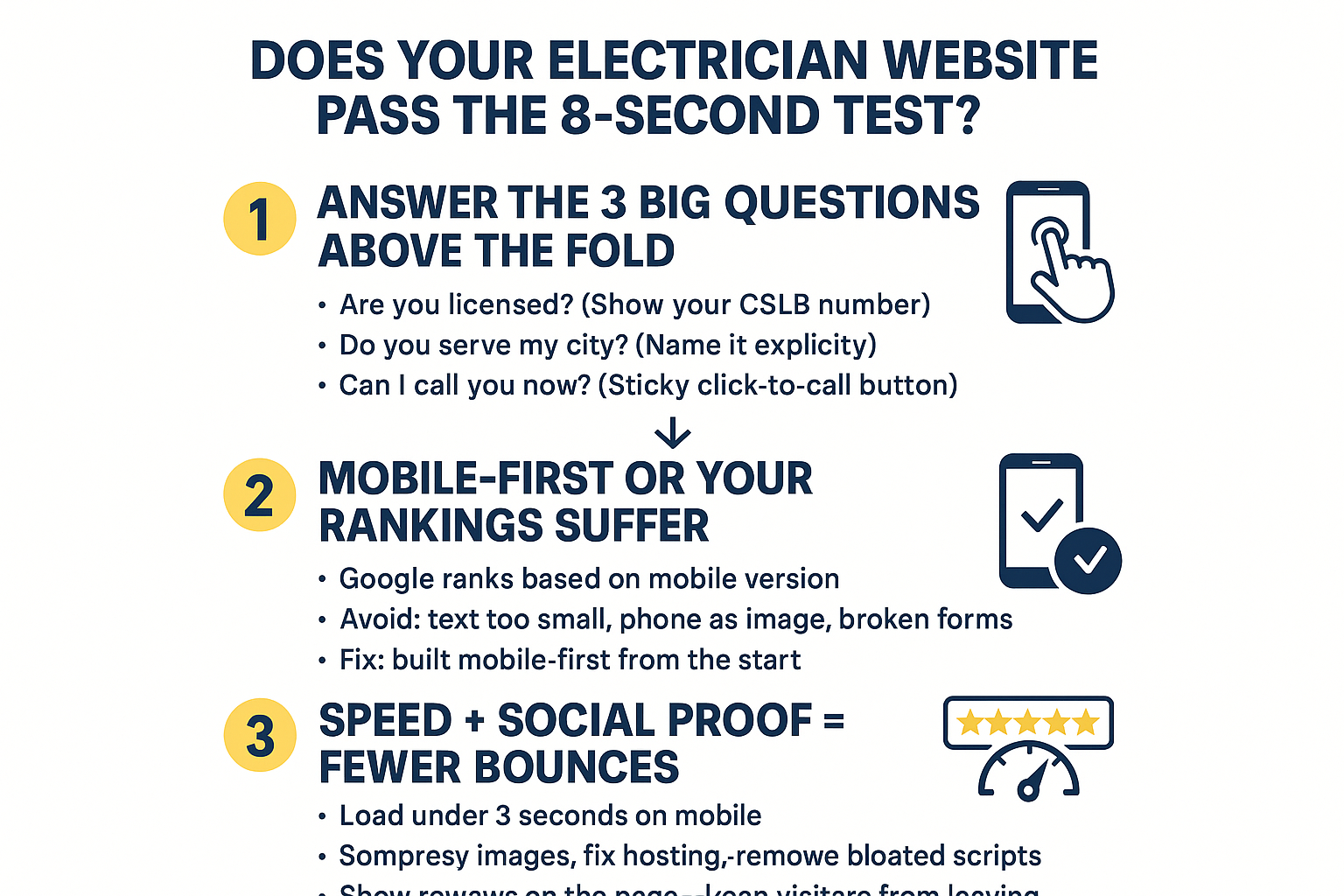
Site Speed and Social Proof: The Two Conversion Factors Nobody Talks About
I want to cover two more things together because they solve the same problem: keeping a visitor on the page long enough to call you.
Site speed first. Industry data consistently shows that contractor websites converting at 2–3% are the ones loading in under 3 seconds on mobile. Above 3 seconds, conversion rates drop sharply — and for every additional second of load time, they drop further. Two electrician sites with near-identical content can rank and convert very differently based on speed alone.
The three most common speed killers on small contractor sites:
- Uncompressed images — a phone photo uploaded straight to the site can be 4–6MB; it should be under 200KB
- Page builders loaded with unnecessary scripts — some drag-and-drop builders run 15–20 background processes the visitor never sees, all of them slowing the page
- Cheap shared hosting — on shared servers, your site competes for resources with hundreds of other sites; under any traffic spike, it slows down or drops
For context, hosting quality matters more than most electricians realize. A site built for a contractor in Salinas but sitting on a $5/month shared host is going to underperform a comparable site on a managed server — even if every other element is identical.
Now social proof. Reviews on a third-party platform like Yelp or Google are trusted, but they pull visitors off your site. A homeowner in Monterey County who clicks away to check your Yelp reviews might end up clicking on a competitor’s ad while they’re there. That’s a lead you had and lost.
Embedding reviews directly on your service page — via a widget that pulls from Google — keeps the visitor on your site and answers their trust question without sending them somewhere else. For an electrician competing in a dense market like Monterey County, having 40 visible five-star reviews on the page itself reduces that bounce risk significantly. The visitor gets the reassurance they need, and the next logical action is to tap the call button — not open another tab.
This same dynamic plays out on HVAC sites, landscaping sites, and roofing sites across the Central Coast. If you’ve read our breakdown of why an HVAC website might be failing in Monterey County, the parallels are direct.
What a Working Electrician Website Has vs. What Most Sites Actually Have
This is the gap I see most often when a contractor shares their existing site with us. The left column is what the site needs. The right column is what’s usually there instead.
| Element | What It Should Do | What Most Sites Actually Have |
|---|---|---|
| Click-to-call button | Sticky, follows the user as they scroll, one tap to dial | Phone number in the footer — visible only if you scroll all the way down |
| Service area | Named cities listed above the fold | Vague phrase like ‘serving the local area’ |
| License number | Visible in the header or first section | Buried in footer text or missing entirely |
| Mobile performance | Loads under 3 seconds, all elements tappable | Desktop site forced into mobile view, broken forms |
| Reviews | Embedded on service pages, 20+ visible | Link to Yelp profile — visitor leaves the site |
| Page speed | Under 3 seconds on mobile | 5–8 second load from uncompressed images and bloated plugins |
What This Means for Electricians Searching for Website Examples
If you came to this article looking at electrician website examples hoping to find a design you like, I’d push back on that instinct a little. Design is the last thing to worry about.
The sites worth copying aren’t the ones that look the most impressive. They’re the ones that answer the visitor’s question fast, load without hesitation on a phone, and show enough social proof that the visitor trusts you before they’ve ever spoken to you. Those three things are what drive calls.
A contractor in Salinas with a clean, fast, mobile-built site and 40 reviews on the page will out-convert a competitor with a beautiful custom design that loads in 6 seconds and hides the phone number in the footer. Every time, without exception, in my experience.
The other piece worth knowing: as AI-powered search becomes more common, the content and structure of your site also affects whether you show up in tools like ChatGPT and Perplexity when someone asks for an electrician recommendation in Monterey County. That’s a newer visibility layer most electrician sites aren’t built for yet. This article on why your competitor showed up in ChatGPT and you didn’t explains exactly how that works.
And if you’re weighing whether to invest in a better site or put that budget into Google Ads, understanding what contractors actually pay for Google Ads is worth reading before you decide — because the answer depends a lot on how well your site converts the traffic once it arrives.
Frequently Asked Questions About Electrician Websites
Does my electrician website actually need to show my CSLB license number?
Yes — and not just for legal reasons. Homeowners in Monterey County making a hiring decision are looking for trust signals fast. A visible CSLB number tells them you’re legit without them having to go verify it somewhere else. It’s one of the quickest ways to reduce the friction between “finding your site” and “picking up the phone.”
How do I know if my current site is actually hurting my rankings?
Run your site through Google’s PageSpeed Insights tool — it’s free and gives you a mobile score and a list of specific issues. Anything below a 50 on mobile is actively costing you rankings. Common culprits are image file sizes, render-blocking scripts, and server response time. If you’re not sure what the results mean, that’s a fair reason to have someone who does this daily take a look.
Should I collect more Google reviews before I redo my website?
Both matter, but they serve different parts of the problem. Reviews help you get found and get trusted. Your website is where that trust either gets confirmed or lost. I’d work on both at the same time rather than waiting on one to finish before starting the other.
What’s a realistic cost for a contractor website on the Central Coast?
It varies quite a bit depending on the number of pages, whether copywriting is included, and who’s building it. In the Monterey County market, contractor websites built by local agencies generally run somewhere in the $2,500–$6,000+ range for a proper mobile-first build — though that’s a general estimate, not a fixed price. A quote from the agency building yours will reflect what your specific site actually needs.
What’s the difference between a website that ranks and one that actually brings in calls?
Ranking gets you found. Converting gets you hired. A site can sit at position 3 on Google and still generate almost no calls if the mobile experience is poor, the phone number isn’t tappable, or the visitor can’t quickly confirm you serve their city. We’ve written specifically about why contractor websites rank but don’t ring — it’s worth reading if you’re in that situation.
Want to Know If Your Electrician Site Is Actually Working?
We work with home service contractors across Monterey County — from Salinas and Marina to Pacific Grove and Carmel Valley — and we’re happy to take an honest look at what your current site is and isn’t doing. No pressure, no generic audit report. If you want a straight conversation about what it would take to get your site generating consistent calls, you can book a Discovery Call with Phil at https://calendly.com/core6-marketing/30min.