Direct Answer: A handful of AI tools — mainly for estimates, follow-up emails, and job scheduling — are saving contractors real hours each week. Most other AI hype isn’t worth your time yet.
If you run a home service business on the Central Coast, you’ve probably heard more about AI in the last 18 months than in the previous decade combined. Most of it is noise. But buried underneath all that noise are a few tools that are actually saving contractors 5 to 10 hours a week on tasks that have nothing to do with the job itself.
This isn’t about robots replacing roofers in Salinas or AI writing estimates for a plumber in Marina. It’s about the unglamorous admin work — answering the same questions over text, typing up follow-up emails, chasing down unpaid invoices — that eats into your day whether you have two crews or ten.
We’ve watched contractors across Monterey County start using a handful of these tools in the past year. Some saved real time. Others were a waste of a free trial. Here’s what’s actually working.
Where Contractors Actually Lose Time (Before We Talk About Tools)
Before any tool is worth talking about, you need to know which problem it solves. Most owner-operated contractors we work with on the Central Coast lose time in three specific places:
- Answering the same questions repeatedly — pricing, availability, service areas, what’s included
- Following up with leads who didn’t respond after the first call or estimate
- Writing and sending routine communications — confirmation texts, review requests, job summaries
Those three things don’t require your expertise. They require time, and they happen every single day. A plumber in Seaside running two trucks shouldn’t be spending 45 minutes a day on that. But most are.
The AI tools that actually help are the ones that handle exactly those categories — not the ones promising to run your whole business. Keep that filter in mind as we go through what’s worth trying.
AI for Estimates and Job Scoping
Estimating is still mostly a human job. Anyone who tells you otherwise hasn’t actually been on a roof in Carmel Valley or tried to scope a remodel on a 1940s home in Pacific Grove. The conditions, the access issues, the material quirks — those require eyes on the job.
But the writeup part of an estimate is a different story. Once you know what the job needs, turning your notes into a professional, itemized document is exactly the kind of repetitive task AI handles well.
Tools like Jobber, ServiceTitan, and standalone AI writing assistants like ChatGPT or Claude can take your rough notes — “replace 3 sections of fascia, repaint exterior trim, maybe 6 hours labor” — and turn them into a clean, professional estimate in under two minutes. You review it, adjust the numbers, and send. Some contractors report cutting their estimate documentation time from 20 minutes down to 5 per job.
The bigger time savings show up when you’re doing multiple bids in a day. An HVAC company in Monterey handling five service calls and two new installs isn’t losing one hour to paperwork — they’re losing four or five. That math adds up fast.
One honest note: AI estimates are only as good as the notes you feed them. Garbage in, garbage out. But if you already know how to scope a job, the writeup no longer needs to take your evening.

AI for Lead Follow-Up and Customer Communication
This is where most contractors leave real money on the table. Studies consistently show that a lead who doesn’t hear back within 5 minutes is 80% less likely to convert — but most owner-operators are on a job and can’t respond in 5 minutes. That’s not a discipline problem. That’s physics.
AI-powered tools can send an automatic text or email the moment someone fills out your contact form or calls and doesn’t reach you. Not a cold, robotic message — a warm, personalized-sounding response that tells them you got their request, you’ll be in touch soon, and here’s what to expect.
Tools doing this well right now:
- GoHighLevel — widely used by home service contractors; handles missed-call texts, lead nurture sequences, and review requests automatically
- Jobber’s AI features — built specifically for field service businesses, includes auto-quote follow-ups and appointment reminders
- Housecall Pro — similar to Jobber, with automated post-job review requests via text
For a landscaping company in Watsonville running a lean crew, an automated follow-up sequence that contacts a new lead three times over 48 hours — without the owner lifting a finger — can easily recover two or three jobs a month that would have otherwise gone cold.
We wrote about why landscapers on the Central Coast keep getting low-ball leads online — and part of that problem is response time. The contractor who answers first often wins the job, even if they’re not the cheapest.
AI Tool Comparison for Home Service Contractors
Here’s a quick reference showing the most common AI-assisted tools contractors on the Central Coast are using, what problem they actually solve, and roughly what they cost.
| Tool | Primary Use | Approximate Monthly Cost | Best Fit For |
|---|---|---|---|
| GoHighLevel | Lead follow-up, missed call texts, review requests | $97–$297/month | Any trade with a steady lead volume |
| Jobber (with AI) | Estimates, scheduling, post-job follow-up | $69–$199/month | Landscapers, cleaners, handymen, field services |
| Housecall Pro | Booking, dispatch, automated review requests | $65–$169/month | HVAC, plumbing, electrical — service call businesses |
| ChatGPT / Claude | Estimate writeups, email drafts, FAQ responses | $0–$20/month | Any contractor who writes their own content |
| Otter.ai | Voice-to-text transcription for job notes | $0–$17/month | Contractors who hate typing after a long day |
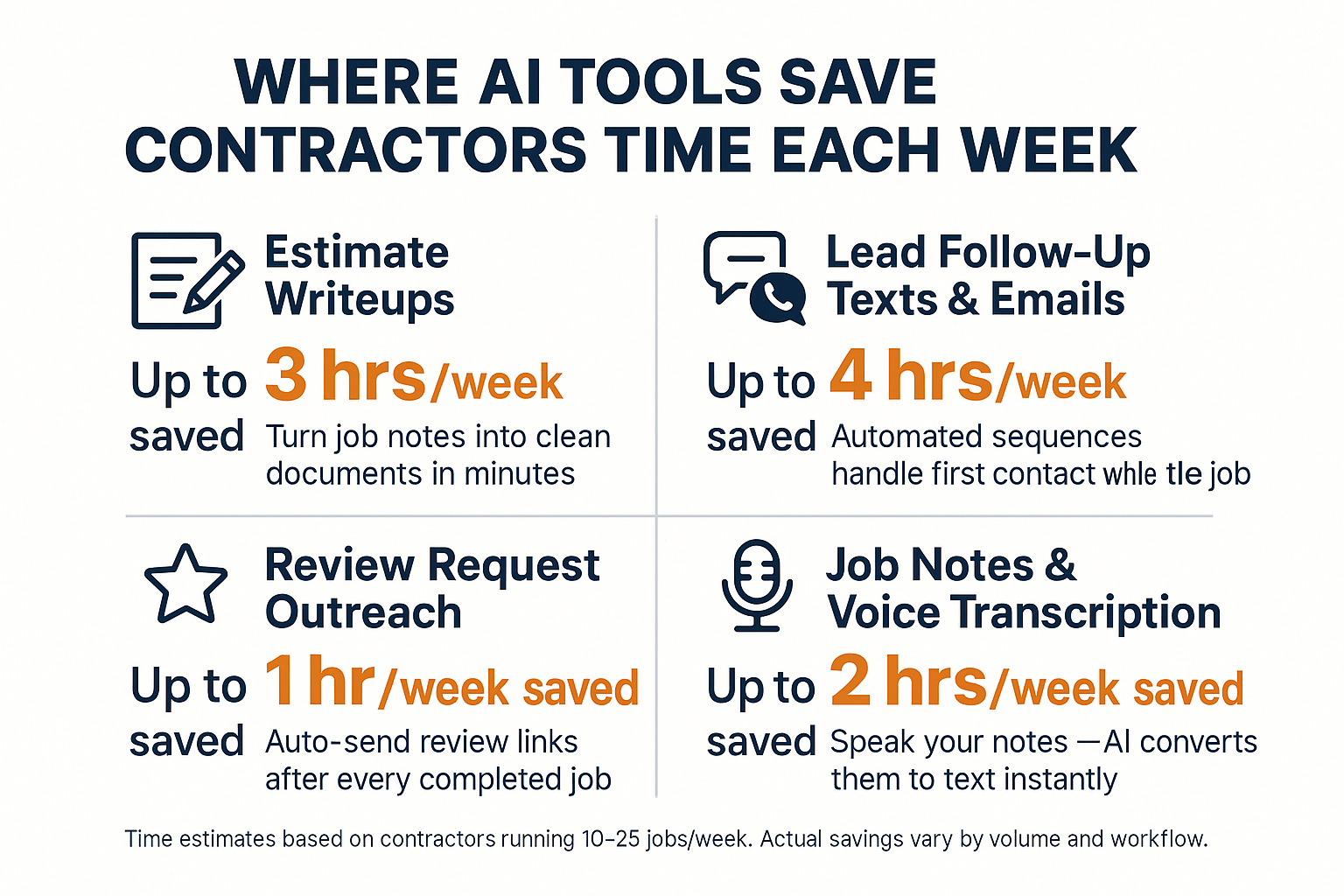
Where AI Saves Contractors the Most Time Per Week
This breakdown shows the average weekly time saved by task category when contractors use AI tools consistently — based on field reports from home service businesses.
What AI Still Can’t Do for a Contractor
There’s a version of this conversation that oversells AI as the answer to everything. We’re not doing that here.
AI cannot inspect a crawl space in Hollister and tell you if the subfloor needs replacing. It cannot look at a roof in Carmel and identify the flashing issue that a photo won’t catch. And it absolutely cannot build you a relationship with a repeat customer in King City who’s called you three times in five years because you showed up and did the job right.
Field expertise, judgment, and trust are still entirely human. We covered this in depth in why the trades are actually AI-resistant — and that piece holds up. The physical nature of what contractors do is one of the strongest protections against being replaced by software.
The contractors getting burned by AI hype are usually the ones who tried to use it where human judgment matters — pricing a complex job, deciding whether to take on a difficult client, writing a proposal for a general contractor relationship worth $200,000. Those still require a person.
Use AI for the repetitive stuff. Stay hands-on for everything else.
AI and Your Online Visibility — A Different Angle
There’s one more category worth mentioning, and it’s less about your internal operations and more about how customers find you.
AI-powered search — ChatGPT, Perplexity, Google’s AI Overviews — is changing how people look for local contractors. When someone in Monterey types “best plumber near me” into ChatGPT instead of Google, the results that come back aren’t necessarily the same as a traditional search. And if your business isn’t structured to show up in those answers, you’re invisible to a growing segment of searchers.
We wrote about this specifically in does AI search change how customers find a plumber or roofer — worth reading if you haven’t yet. And if your competitor is already showing up in ChatGPT results and you’re not, here’s why that’s happening.
This is a separate issue from the operational AI tools we’ve been covering. But it matters just as much. The tools above save you time internally. Visibility in AI search is about making sure the phone rings in the first place.
Frequently Asked Questions About AI Tools for Contractors
Do I need to be tech-savvy to use any of these tools?
For the most part, no. Tools like Jobber and Housecall Pro were built specifically for tradespeople who aren’t sitting in front of a computer all day. Most have mobile apps, straightforward setup, and customer support that walks you through the first steps. If you can use your phone to text, you can use most of these tools.
Is it worth paying $100 to $200 a month for something like GoHighLevel?
It depends on your lead volume. If you’re getting 15 or more inbound leads per month and losing even two or three because you couldn’t follow up fast enough, the tool pays for itself easily. If you’re a one-person operation in Salinas doing mostly repeat and referral work, it might be overkill right now.
Can I use ChatGPT to write my website content?
You can use it as a starting point, but be careful about publishing AI-written content directly. We covered the risks in detail in the truth about AI-built websites for contractors — generic AI copy can actually hurt your search rankings if it’s not edited to reflect your specific business, service area, and expertise. Use it to draft, then rewrite in your own voice.
What about AI tools for dispatching multiple crews?
If you’re running three or more trucks in Monterey County, a tool like ServiceTitan or Housecall Pro with AI-assisted dispatching can meaningfully reduce the time your office person (or you) spends on routing. It’s not magic, but it does reduce the back-and-forth on scheduling. Expect a 30 to 60 day learning curve before it feels natural.
Will using these tools make my business show up better on Google?
The operational tools — Jobber, GoHighLevel, Housecall Pro — won’t directly affect your Google rankings. What they can do is increase your Google review count through automated post-job requests, which does help your local visibility over time. For actual SEO improvements, that’s a separate strategy.
I tried one of these tools last year and quit after two weeks. What went wrong?
Usually one of two things: the setup took longer than expected, or the tool was solving a problem the contractor didn’t actually have yet. The tools that stick are the ones you implement at the right stage of business — when the pain point is real enough that the tool’s learning curve is worth it. If you weren’t consistently losing leads to slow follow-up, a lead automation tool wasn’t your problem to begin with.
Want to Know Which Tools Are Worth It for Your Business Specifically?
The honest answer is that it depends on where you’re losing time and leads right now — and that looks different for a two-person electrical outfit in Seaside than for a landscaping company running four crews out of Salinas. Core6 Marketing works exclusively with home service contractors on the Central Coast, and we’re glad to talk through what’s actually moving the needle for businesses at your stage. If that conversation sounds useful, you can book a 30-minute call with Phil at https://calendly.com/core6-marketing/30min.