
If you want to learn how to rank higher in Google Maps, your Google Business Profile is where you need to put your energy first. It’s the most important factor, hands-down. Think of it as your digital storefront for the Monterey Bay Area—it’s the primary source of information Google uses to decide your relevance, distance, and prominence in local search results.
Your Foundation for Google Maps Success
Your Google Business Profile (GBP), which is a free tool from Google, is the bedrock of your local visibility. For a small business in Monterey County, a well-kept GBP isn't just another listing; it’s a powerful lead-generation machine.
It’s the first place potential customers in Salinas or Santa Cruz will see your brand, check your services, and decide whether to call you or your competitor. Neglecting it is like building on sand—it just won't hold up.
The first move is making sure every single piece of information is complete and accurate. You have to get into every available section and give Google the clearest possible picture of who you are and what you do. This is the information that gets you into the coveted "Map Pack," those top three local results that grab almost all the clicks.
Choosing Your Business Categories Correctly
Getting your categories right is absolutely critical. Your primary category must be the one that best describes your main service—think "Plumber" or "Coffee Shop." But don't stop there. Most businesses wear multiple hats, and the secondary categories are where you capture that nuance.
For instance, a plumber based in Hollister might have "Plumber" as their primary category but should also add others like:
- Water Heater Installation & Repair
- Drain Cleaning Service
- Gas Fitter
This level of detail is what helps you appear for those specific, high-intent searches. A homeowner searching for “water heater repair near me” is far more likely to find your profile if you've explicitly listed that as a service.
Crafting a Compelling Business Description
You get 750 characters for your business description—make them count. This is your elevator pitch. Use this space to connect with local customers and work in relevant keywords naturally. Don't just list services; tell a story that resonates with people from our coastal economy. Mention your commitment to serving the local community or what makes you different from the competition.
A thoughtfully written description gives both customers and Google context. It's your chance to build trust before they even click over to your website.
The Power of a Complete Profile
Industry data consistently proves that a complete GBP profile directly correlates with higher rankings. In fact, a recent analysis showed that Google dedicates roughly 27% of its local ranking algorithm's weight to GBP signals. This includes everything from a perfectly consistent Name, Address, and Phone number (NAP) to selecting all relevant categories.
For local business owners, this alignment between what a user is searching for and what your profile says you offer is precisely what turns a search into a qualified lead.
You can dig deeper into how these signals affect your position by reading detailed analyses on the top local SEO ranking factors.
The process of optimizing your GBP is pretty straightforward when you break it down into a few core actions.
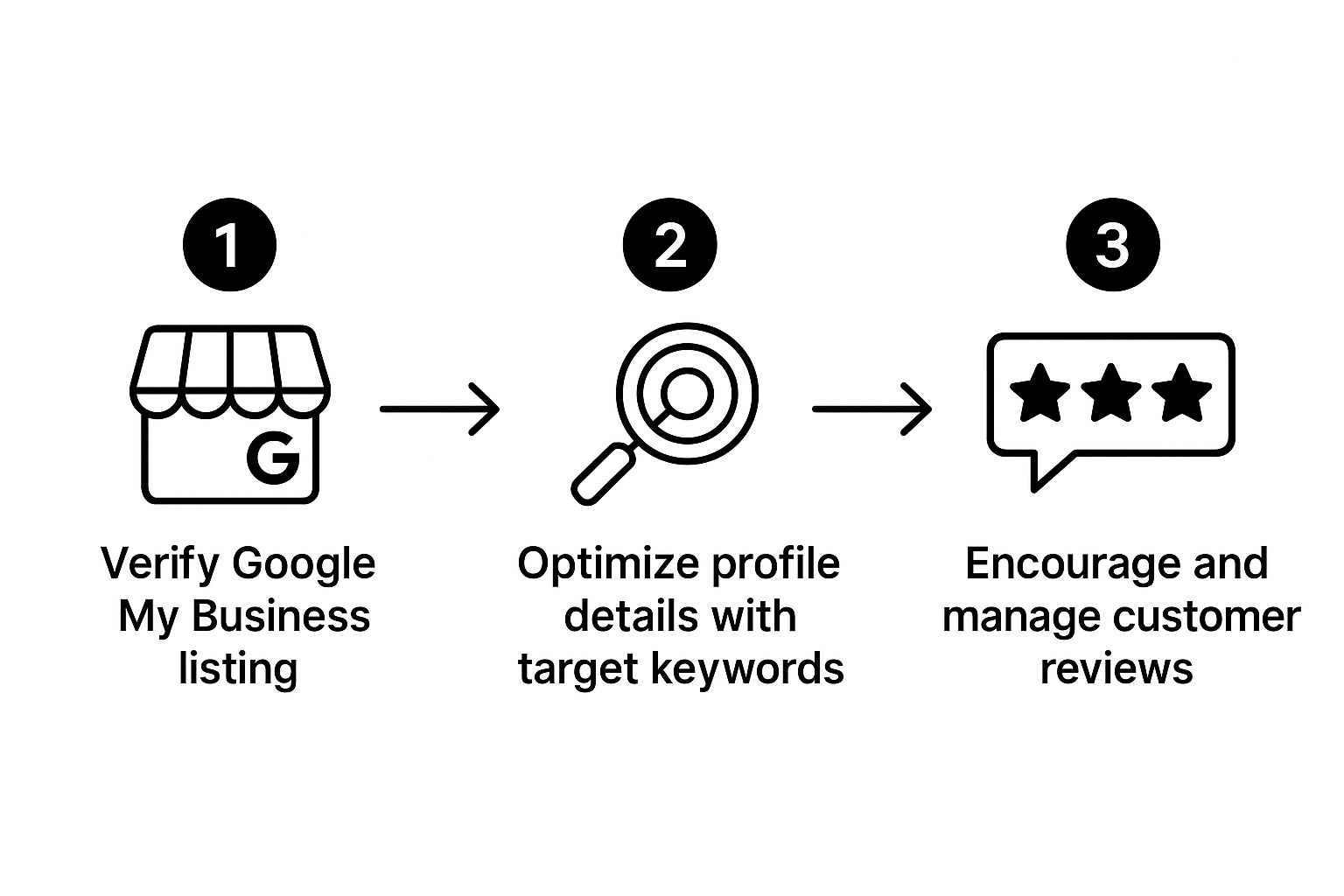
This visual guide breaks it down perfectly: verifying your business, meticulously filling out every detail, and actively managing customer feedback are the cornerstones of a winning strategy. These aren't just suggestions; they're essential for competing in today's local search game.
For contractors, mastering your profile is the first and most impactful step you can take. We dive even deeper into this in our full guide to SEO for home service contractors.
Build Trust with a Strong Review Strategy
Reviews are the digital currency of trust, and Google’s algorithm values them immensely. In the competitive Monterey Bay Area, what your customers say about you online can be the deciding factor for someone choosing your business over a competitor in Santa Cruz.
If you want to know how to rank higher in Google Maps, you have to understand that a steady stream of authentic, positive feedback is one of the most powerful signals you can send.
Think about it from a customer’s perspective. When they see a business with dozens of recent, glowing reviews, it builds instant confidence. On the flip side, a profile with just a few reviews—or worse, unanswered negative ones—creates doubt. Google sees this and rewards businesses that are clearly trusted by the local community.

Making It Easy to Leave a Review
The biggest roadblock to getting more reviews is usually the process itself. You absolutely have to make it dead simple for your clients. A happy customer in Hollister might be willing to leave a review, but they won’t jump through hoops to do it.
Your job is to remove every bit of friction. Here are a few proven ways to do just that:
- Create a Direct Review Link: Your Google Business Profile has a unique, shareable link that takes customers straight to the review window. Bookmark it. Have it ready to go at all times.
- Use QR Codes On-Site: For retailers or service techs, a QR code on an invoice, business card, or flyer is a game-changer. A quick scan with their phone, and the customer is exactly where they need to be.
- Send a Personalized Follow-Up: A simple, friendly email or text after a job is done can be incredibly effective. Thank them for their business and drop in your direct review link.
To make this even easier, have some message templates ready. For some great ideas, check out our guide on proven client email scripts that you can adapt for your review requests. A well-crafted message feels personal and appreciative, not pushy.
Responding to Every Single Review
This is where so many businesses in Monterey County drop the ball. Responding to reviews—both good and bad—is just as important as getting them in the first place. It shows you’re engaged, you care about what people think, and you’re actively managing your reputation.
For positive reviews, a simple "Thank you so much for your kind words!" shows you’re listening and you appreciate their business. But it's the negative reviews where the real opportunity lies.
A thoughtful, professional response to a negative comment is a public display of your customer service. It can turn a potential negative into a massive trust signal for future customers who see that you take accountability and work to resolve issues.
Never, ever get into an argument online. Instead, acknowledge their experience, apologize that it wasn't perfect, and offer to take the conversation offline to make it right. That one action can salvage a customer relationship and demonstrate your professionalism to everyone else watching.
The Power of Keywords in Reviews
Here’s a pro-tip most businesses miss: the words your customers use in their reviews can influence what searches you rank for. If multiple customers in Salinas mention your "emergency plumbing repair" in their five-star reviews, Google’s algorithm starts associating your business more strongly with that exact service.
You can't tell customers what to write, of course. But you can gently guide them. When asking for a review, you could say something like, "We'd love to hear what you thought about the furnace installation we did for you." This subtly prompts them to mention the specific service, naturally boosting your keyword relevance for more targeted local searches.
If you want to get really strategic and see what terms are working for your competitors, you can even learn how to scrape Google Maps reviews to analyze trends and keyword usage.
Master Local Citations for Hyper-Local Authority

Once you've dialed in your Google Business Profile, it's time to tackle the next pillar of local SEO: citations. Think of a citation as an online mention of your business—a digital breadcrumb that proves you’re a legitimate company operating where you say you do.
Each time Google finds your business's Name, Address, and Phone number (NAP) listed online, it acts like a vote of confidence. It reinforces your connection to a specific area, which is absolutely critical for ranking higher in Google Maps and dominating local search in a competitive market like Monterey County.
Why Absolute NAP Consistency Is a Non-Negotiable
Let's get practical. Imagine Yelp lists your business with "St." in the address, but your own website says "Street." A human sees that and doesn't think twice. But for Google's algorithm? That's a red flag. It creates confusion and signals that your business data might be unreliable, which can directly harm your rankings.
The goal is to establish one single, authoritative version of your NAP and then plaster it everywhere online with zero deviation. This meticulous attention to detail is how you prove to Google that your business is established and trustworthy. For businesses trying to show up for searches in cities like Gilroy and Watsonville, this isn't optional.
Key Takeaway: In local SEO, consistency builds authority. Even tiny NAP variations across different websites can dilute your ranking signals and hand an advantage straight to your competitors. Your mission is to create a perfectly uniform digital footprint.
First, Audit and Clean Up Your Existing Citations
Before you rush off to build a bunch of new listings, you need to find out what’s already floating around on the web. An old phone number on a dusty Yellow Pages profile or a previous address on a long-forgotten directory can actively sabotage your efforts. A thorough citation audit is your first move.
You could start by manually Googling your business name and any variations. A more efficient route, however, is to use an online tool that scans the web for you. These tools will generate a report of your existing citations and, more importantly, highlight any inconsistencies.
Once you have your report, the cleanup work begins:
- Pinpoint Inaccuracies: Go through the list and flag every single listing that has an incorrect name, old address, or wrong phone number.
- Claim and Correct: For each incorrect listing, you’ll have to claim the profile if you haven't already. Then, you can log in and manually update the information to match your official NAP.
- Scrub Duplicates: It’s common to find multiple listings for the same business on one directory. Get those duplicate profiles removed to ensure all your authority flows into a single, correct listing.
Now, Build High-Quality Local Citations
With your existing online presence cleaned up, it's time to build new, high-quality citations. This isn't about quantity. It's about getting your business listed on directories that are relevant, authoritative, and—most importantly—local. For a business in San Benito County, this is one of the most powerful ways to strengthen your geographic relevance.
Start with these must-have citation sources:
- The Big Data Aggregators: Services like Data Axle and Neustar Localeze are the wholesalers of business data. They feed information to hundreds of other online directories, so getting your NAP correct here creates a massive, positive ripple effect.
- Core Local Directories: Platforms like Yelp, Apple Maps, and Bing Places are non-negotiable. You have to be on them, and your profile needs to be perfect.
- Hyper-Local and Niche Sites: This is where you gain a real competitive edge. Hunt down listings on sites specific to our area, like the Santa Cruz County Chamber of Commerce, or industry-specific directories built for your field.
Building citations is a slow, painstaking process, but it's absolutely essential. It's one of the biggest factors in local SEO that should never be overlooked, laying the groundwork for long-term visibility and authority in the Monterey Bay market.
Send the Right On-Page SEO Signals to Google
Your Google Business Profile doesn't exist in a bubble. If you’re serious about figuring out how to rank higher in Google Maps, you need to think of your website and your GBP as a powerful tag team. Google constantly cross-references the information on your website to verify what you’re claiming on your profile. A weak or poorly optimized site will drag your Maps ranking down.
Think of it like this: your GBP is the billboard on the highway, but your website is the proof that your business is real, active, and an expert in its field. When your site sends strong, clear signals about who you are and where you operate, Google’s confidence in your business goes through the roof. This is where on-page SEO—the optimizations you make directly on your own website—becomes your secret weapon.
To get a clearer picture of what this means, let's break down the difference between the signals you control on your site versus the ones you build elsewhere.
On-Page vs. Off-Page Local SEO Signals
Understanding the key differences between signals you control on your website and those you build elsewhere.
| Signal Type | Examples | Why It Matters for Maps |
|---|---|---|
| On-Page SEO | Service pages, location pages, NAP consistency, embedded maps, mobile speed. | Tells Google what you do and where you do it with authority. It's the foundation of your local identity. |
| Off-Page SEO | Google reviews, business directory citations (e.g., Yelp, Angi), backlinks from local partners. | Builds trust and authority by showing third-party validation. It's what others say about you online. |
Both are critical, but on-page SEO is where you build the foundation. Get this right, and everything else becomes more effective.
Create Hyper-Local Service and Location Pages
For a local business, the single most powerful on-page tactic is creating dedicated pages for each of your core services in specific cities you serve. A generic "Roofing Services" page is a decent start, but a page for "Roof Repair in Salinas" is infinitely better. An SEO agency in Salinas would call this a non-negotiable strategy.
Why? Because it tells Google you don't just work in Salinas; you are an authority there.
These pages are your chance to prove your local expertise. Imagine a homeowner in Santa Cruz County searching for a custom home builder. If you have a detailed page showing off your projects right there in their county—with photos from local job sites and testimonials from their neighbors—you instantly become the most relevant and trustworthy choice.
Here are a few ideas to get you thinking:
- HVAC Maintenance for Pacific Grove Homes
- Emergency Plumbing Services in Hollister
- Kitchen Remodeling Contractor in Carmel-by-the-Sea
Don't just copy and paste content, swapping out the city name. That's a rookie mistake. Each page needs to be a unique, valuable resource. Talk about common architectural styles in that town or projects you’ve completed in well-known neighborhoods. That’s how you show real expertise.
Display Your NAP and Embed a Google Map
In local SEO, consistency is everything. Your website needs to be the source of truth for your business information. Your Name, Address, and Phone number (NAP) should be displayed clearly on your site, ideally in the footer so it appears on every single page.
And it must be an exact match to what’s on your Google Business Profile. No shortcuts, no abbreviations, no variations. If your GBP says "Street," your website shouldn't say "St."
Beyond just text, you need to embed a Google Map directly onto your contact page. This isn't just for helping customers find you; it's a direct, technical signal to Google's crawlers that visually confirms your location.
An embedded map creates an undeniable link between your website and your physical location. It reinforces the geographic signals that are so vital for Maps visibility. It’s a simple but incredibly effective way to solidify your local identity in Google's eyes.
This small step closes the loop, making it dead simple for Google to connect the dots between your digital profile and your real-world service area. For a deeper dive into how different SEO elements work together, check out our guide on the 3 crucial SEO elements that boost website traffic.
Prioritize Mobile-Friendliness and Page Speed
Let's be realistic: a huge number of local searches happen on a phone while someone is on the go. In fact, industry data shows that nearly 60% of all Google searches now come from mobile devices.
If a potential customer clicks from your Maps listing to your website on their phone and it’s slow, clunky, or impossible to navigate, they’re gone. Instantly.
That "bounce" sends a terrible signal to Google: your site provides a poor user experience. The result? Your rankings tank, both in regular search and on Google Maps.
Your website absolutely must be responsive, meaning it automatically adjusts to look great and work perfectly on any screen, from a big desktop monitor to a small smartphone. Page speed is just as important. A site that loads in under three seconds will keep visitors engaged, while one that takes five or more seconds will hemorrhage potential leads.
For any business looking to compete today, these technical fundamentals are no longer optional—they're the price of entry.
Keep Your GBP Active to Boost Engagement
Having a complete profile is a great start, but it's the active profiles that really win in local search. Think of your Google Business Profile as your digital storefront. The engagement features—like Posts and Q&A—are how you invite customers inside. This is a critical piece of the puzzle for anyone trying to figure out how to rank higher in Google Maps, because Google’s algorithm rewards businesses that are active, helpful, and consistently part of their local community.

Put yourself in Google's shoes for a second. An actively managed profile—one with fresh photos, recent updates, and answered questions—signals a healthy, reliable business. A profile that’s been sitting there collecting dust for months? It sends the opposite message. For a business in a competitive market like Monterey County, this consistent activity is a huge way to show Google you're a prominent and relevant choice for customers.
Did You Know?
Monterey County's agriculture industry is nicknamed the "Salad Bowl of the World," a testament to our region's rich productivity. Applying that same consistent effort to your digital presence can yield a similar bumper crop of new leads.
Use Google Posts Like a Mini-Blog
Google Posts are probably one of the most underutilized tools in the GBP toolbox. This feature lets you share updates, offers, news, and project highlights directly on your search listing. It's essentially a mini-blog that can catch a potential customer’s eye right when they're most interested.
These posts show up right on your profile and are a fantastic way to showcase your recent work and your company's personality. For instance, a roofer in Salinas could create a post titled, "Just Wrapped Up a Tile Roof Repair in Salinas!" complete with some killer before-and-after photos. This does more than just show off your work; it hammers home your local activity.
To keep things fresh, mix up your post types:
- Offer Posts: Announce a seasonal special. Think, "10% Off HVAC Tune-Ups in Santa Cruz This Month."
- Update Posts: Share company news, like welcoming a new technician to the team.
- Event Posts: If you're at a local home show or community fair, let people know where to find you.
- "What's New" Posts: This is perfect for highlighting a recently completed project with high-quality photos.
Making a habit of posting regularly tells Google you're an active business, which directly feeds into your prominence score. I always recommend aiming for at least one new post every week to keep the momentum going.
Get Ahead of Questions with the Q&A Section
The Questions & Answers section on your GBP is a goldmine for building trust and handling customer concerns before they even have to pick up the phone. But here's the thing: most business owners just wait for customers to ask questions. The smarter move is to get in there and pre-populate this section yourself.
Jot down the most common questions your front office team gets every single day. Then, go to your profile, ask those exact questions, and immediately post clear, helpful answers. This tactic lets you control the conversation and provide the right information from the get-go.
A well-managed Q&A section is a powerful signal of your expertise and customer focus. It shows potential clients in Carmel-by-the-Sea that you already know what they need and are ready to help, building their confidence before they ever dial your number.
Start with the basics that every business gets asked:
- "Are you licensed and insured?"
- "What cities and towns do you service?"
- "Do you offer free estimates?"
- "What are your hours for emergency service?"
Once you've covered those, you can dig into more service-specific questions. A plumber in Gilroy might add, "Do you specialize in tankless water heater installation?" and then provide a detailed answer. Not only does this help your customers, but it also injects valuable, relevant keywords right onto your GBP.
Flesh Out Your Services with Real Detail
Finally, don't just list your services—describe them. Your GBP Services section is your chance to add detailed descriptions and even pricing for every single thing you do. This is where you go beyond a simple label like "Electrical Repair" and explain exactly what that service includes.
For each service, write a short but compelling description of the work, the benefits for the customer, and why they should choose you. This level of detail helps Google truly understand the full scope of your business, making it much easier to match your profile to specific, long-tail searches. A homeowner looking for an "electrician for a panel upgrade in Monterey" is way more likely to find you if you have a detailed service entry for "Electrical Panel Upgrades." It turns your profile from a basic listing into a real resource that attracts qualified leads.
Frequently Asked Questions About Google Maps SEO
Even with a clear roadmap, most business owners have questions about what local SEO looks like in the real world. When you're trying to figure out how to rank higher in Google Maps, a few common uncertainties can really slow you down.
Let's tackle the questions we hear most often from fellow business owners across the Monterey Bay Area.
How Long Does It Take to See Results?
This is the big one we get from clients in Salinas and Santa Cruz. The honest answer? It depends.
While some tweaks to your Google Business Profile can bring small, noticeable changes within a few weeks, real local SEO is a marathon, not a sprint. You're building lasting authority and trust with Google, and that simply takes time.
Think of it like building a reputation in your community. Earning authentic reviews, building high-quality local citations, and getting your on-site signals recognized by Google are all cumulative efforts. For most businesses in competitive markets, seeing significant, stable improvements in Maps rankings typically takes 3 to 6 months of consistent, focused work. It’s an investment, but one that pays off for years.
Do I Need a Physical Address in a City to Rank There?
For that primary "pin" that shows up directly on the map, yes. Google needs a verifiable physical address where you can get mail, just like our office here in Salinas. This is how it anchors your business to a specific location.
However, if you're a service-area business (SAB), you have options. Let's say you run your operation from a home office in Hollister. You can hide your physical address and instead display a shaded service area on the map.
While you won't get that specific map pin in a city like Gilroy without an address there, you can absolutely still rank in the search results for that area. You do this with other powerful signals, like creating city-specific service pages on your website and building local citations that mention those target locations.
My Competitor Is Using Fake Reviews. What Can I Do?
It’s incredibly frustrating, and unfortunately, it happens. The most important rule here is to never, ever retaliate by posting your own fake reviews. That's a quick way to get your own profile suspended. The right way to handle it is to play by the rules and use Google's own tools.
You can report fraudulent reviews by flagging them directly on your competitor's public profile. If the problem is widespread or particularly egregious, you can use Google's Business Redressal Complaint Form.
While you wait for Google to act, your best defense is a great offense. Focus on your own strategy. Build such a strong, authentic review profile that a few fake ones on a competitor's listing become obviously irrelevant to customers who know what to look for.
Is It Better to Have More Reviews or a Higher Rating?
This is a classic case where both are absolutely vital. A high star rating—say, a 4.8 or 4.9—builds immediate trust and credibility with potential customers at a glance. But review quantity and velocity (how frequently you get new ones) are huge ranking signals for Google's algorithm.
A business in Monterey County with 150 reviews and a 4.6-star rating will almost always outrank a competitor with just 10 perfect 5.0-star reviews. Why? The larger volume of recent feedback tells Google that the business is active, popular, and relevant right now.
Your goal should be a continuous stream of new, positive reviews. You can learn more about how online reviews affect your contractor business in our detailed guide.
Ready to stop guessing and start ranking? The team at Core6 Marketing builds custom local SEO strategies that drive real results for businesses in the Monterey Bay Area.
Schedule your no-obligation strategy session today!
By Phil Fisk, CEO, Core6 Marketing
Phil Fisk is the founder of Core6 Marketing, a digital marketing agency dedicated to helping businesses in the Monterey Bay Area dominate their local markets. With a focus on data-driven SEO and lead generation, Phil helps businesses achieve measurable ROI and growth.
Core6 Marketing
1628 N. Main St #263, Salinas, CA 93906
831-789-9320
[email protected]
https://core6.marketing/