
An effective website is your most powerful marketing tool—a digital storefront that works for you 24/7. It’s not just about looking professional. It’s about creating a machine that builds instant trust, captures leads, and separates you from the competition before a potential customer even thinks about picking up the phone.
Your Digital Storefront: Why Great Design Matters
Let’s be real. In today’s market, your website is your most important employee. The days when a simple business card or a Yellow Pages ad were enough are long gone. Modern customers—whether it’s a homeowner with a flickering light or a property manager needing a major rewire—almost always start their search online.
Their journey is predictable: a quick Google search followed by a rapid-fire tour of a few local electrician websites. This is where first impressions are everything. You have a split second to convince them you’re the right choice.
The Critical First Impression
Research consistently proves how much looks matter online. A staggering 94% of a user's first impression is tied directly to your site's design. Users make a snap judgment about your business in just 0.5 seconds, deciding whether to stick around or hit the "back" button.
A clean, professional, and easy-to-use site instantly communicates competence and reliability. In contrast, slow-loading sites contribute to an estimated $2.6 billion in lost sales annually because frustrated users simply give up and go elsewhere.
A clunky, outdated, or broken website doesn't just look bad—it implies your electrical work might be the same. A polished, modern design tells customers you are professional, detail-oriented, and trustworthy.
This initial gut reaction directly impacts your bottom line. A great first impression keeps them on your page, encouraging them to explore your services, read reviews, and ultimately, get in touch. It’s the very first step in turning a casual browser into a paying customer.
First Impressions: The ROI of Key Design Elements
Thinking about design in terms of return on investment can really put things into perspective. Certain elements aren't just cosmetic; they're business tools that directly influence whether a visitor becomes a lead.
Here’s a breakdown of how key design choices translate into tangible business results:
| Design Element | Impact on First Impression | Business ROI |
|---|---|---|
| Professional Logo & Branding | Conveys legitimacy and brand identity. | Builds brand recognition and trust. |
| High-Quality Images/Videos | Shows real work and a real team. | Increases user engagement and credibility. |
| Clear Navigation | Makes it easy to find what they need. | Reduces bounce rate and guides users to conversion. |
| Mobile-Friendly Design | Looks great on any device. | Captures leads from the 60%+ of users on mobile. |
| Prominent Call-to-Action | Tells visitors what to do next. | Drives phone calls, form fills, and lead generation. |
Each of these elements works together to create a seamless user experience that not only looks good but actively works to grow your business.
Stand Out in a Crowded Market
Your local market is probably full of other skilled electricians. A standout website is one of the most powerful ways to differentiate your business. While your competitors might settle for generic, cookie-cutter sites, a custom design lets you showcase what makes your company unique.
Think about what makes you the best choice:
- Emergency 24/7 Service: Is this a core part of your business? Your design should scream it with a highly visible phone number and obvious calls-to-action.
- Specialized Skills: Are you the local expert in EV charger installations or smart home automation? Dedicated, visually engaging sections for these services will attract higher-value clients.
- Commitment to Safety: Displaying your licenses, certifications, and safety awards builds immediate credibility and puts potential customers at ease.
For electrical pros looking to sharpen their digital edge, there are powerful solutions tailored for the electrical industry that can help streamline customer interactions even further.
Ultimately, a great website is the foundation of all your marketing efforts. It’s the perfect hub to direct traffic from search engines, which is absolutely vital for getting found. Understanding how SEO can transform your company is the logical next step to ensure your beautiful new site actually gets in front of the right people at the right time.
Crafting Your Website Blueprint Before You Build
Jumping straight into choosing colors and fonts for your website is like starting a complex wiring job without a schematic. It might feel like you're making progress, but you're really just setting yourself up for a chaotic, ineffective result. A truly successful website—one that works for your electrical business—starts with a solid plan. Think of it as a strategic blueprint that guides every single decision.
This planning phase is all about figuring out who you're trying to reach and what you need them to do once they land on your site. It’s the difference between a website that just sits there looking pretty and one that consistently brings in new jobs. Before you ever talk to a designer or look at a single template, you need to map out your strategy.
Define Your Ideal Customer
You can't be everything to everyone, and trying to be is a surefire way to get lost in the noise. The very first step in creating your blueprint is to get crystal clear on who you want to attract. Are you chasing high-end residential clients for custom lighting and smart home installs? Or is your business built on rapid-response emergency calls?
Let’s break down a few common customer profiles:
- Residential Homeowners: These clients are often looking for emergency repairs, panel upgrades, or fixture installations. They value trustworthiness, quick response times, and straightforward pricing.
- Commercial Property Managers: This group thinks in terms of long-term contracts, reliability, and deep expertise in larger projects like office build-outs or routine facility maintenance.
- General Contractors: They need a go-to electrical subcontractor who hits deadlines without fail and works seamlessly with other trades on new construction or major remodels.
Knowing your ideal customer changes everything. It dictates your website’s messaging, the photos you use, and the features you build. If you're all about emergency services, a huge "Call Now" button is non-negotiable. For commercial clients, a detailed portfolio of large-scale projects and a prominent list of your certifications will do the heavy lifting.
Analyze Your Local Competition
Okay, so you know who you’re targeting. Now it’s time to see what your local competitors are up to. A quick Google search for "electrician in [Your City]" will show you who’s currently winning the digital game. Don't just glance at their sites—put on your detective hat and analyze them with a critical eye.
Dig in and find answers to these questions:
- What services are they pushing on their homepage?
- Does their website load quickly and, more importantly, does it look good on your phone?
- Are they using customer reviews and testimonials to build trust?
- What are they missing? Maybe none of them have a dedicated page for EV charger installations. That’s an opportunity you can jump on.
Your goal here isn't to copy your competitors. It's to identify the standard for quality in your market and then figure out how to blow past it. Note their strengths so you can match them, and pinpoint their weaknesses so you can exploit them. This simple analysis gives you a massive advantage right out of the gate.
Plan Your Core Website Pages
With a clear picture of your customer and your competition, you can finally start outlining the essential pages for your website. Think of these pages as the main circuits of your online presence. Each one has a specific job to do in guiding a visitor from a curious prospect to a paying customer.
At a minimum, an effective electrician website needs these pages:
- Homepage: This is your digital handshake. It has to grab attention instantly, clearly state what you do and where you do it, and direct visitors to other key areas of your site.
- Services Pages: Don't just cram all your services onto one page. Create dedicated pages for each major service (e.g., "Panel Upgrades," "Emergency Repairs," "EV Charger Installation"). Fill them with detailed descriptions, benefits, and relevant photos.
- About Us: This is where you build trust and connection. Tell your company's story, introduce your team, and make your licenses and insurance information easy to find.
- Project Gallery/Portfolio: Show, don't just tell. Nothing is more persuasive than high-quality photos of your finished work.
- Contact Page: Make it incredibly simple for people to get in touch. Include your phone number, email address, a simple contact form, and a map of your service area.
Taking the time to plan is foundational. The electrical design industry itself is seeing incredible growth, with the top firms generating a combined $5.223 billion in revenue. This highlights just how massive the demand is for skilled electrical services. A well-planned website is your best tool for capturing your piece of that market. You can learn more about this surge in the electrical design market to fully grasp the opportunity at hand.
Essential Features Every Electrician Website Needs
A good blueprint is one thing, but it’s the features you build into your site that actually turn it from a digital business card into a lead-generating machine. These are the nuts and bolts—the functional elements that make it incredibly easy for customers to find you, trust you, and hire you.
Getting these features right is what separates a website that gets a few compliments from one that gets your phone ringing off the hook. Think about it: from the moment a potential customer lands on your page, every single element should guide them toward one goal: getting in touch.
Powerful Calls to Action
The single most important feature for turning a visitor into a lead is your call-to-action (CTA). This isn't the place for vague suggestions like "Learn More." You need clear, urgent, and value-driven commands that speak directly to a customer's immediate problem.
Think about what a homeowner with a flickering circuit breaker wants to see. It’s not a "learn more" button.
Here are a few examples that actually work:
- Request a Free, No-Obligation Estimate
- Schedule Your Service Online Now
- Call Now for 24/7 Emergency Service
- Get a Quote for Your Project Today
These CTAs need to be impossible to miss. Use bright, contrasting buttons and place them everywhere—on your homepage, at the end of every service page, and locked into your website's header. Make taking that next step the easiest thing for them to do.
Clickable Contact Information
Picture this: a potential customer is dealing with a power outage and finds your site on their phone. If they have to scramble to copy and paste your phone number just to make a call, you’ve already created a frustrating experience. With over 60% of website traffic coming from mobile devices, this isn't just a nice-to-have; it's non-negotiable.
Your phone number must be a "click-to-call" link everywhere it appears. It’s a small detail that allows a user to simply tap the number to call you, instantly connecting them with your business. This simple tweak dramatically improves the mobile experience and boosts call-through rates.
Pro Tip: Don't bury your contact info. Your phone number should be proudly displayed in the top right corner of every single page on your website. This is prime digital real estate that users are conditioned to look at when they need help—fast.
Building Trust with Social Proof
Before anyone hires an electrician, they want proof that you’re skilled, reliable, and trustworthy. Social proof is how you deliver that proof without saying a word. It’s tangible evidence from past customers and official sources that you’re the right choice for the job.
Weave these trust-building elements throughout your site:
- Customer Testimonials: Display glowing quotes from happy clients. Make sure to include their name and city to add a layer of authenticity.
- Five-Star Reviews: Use a simple widget to pull in your latest positive reviews directly from platforms like Google or Yelp.
- Licenses and Certifications: Create a dedicated, easy-to-find section to display your state license number, insurance details, and any special certifications you hold.
Placing these elements on your homepage and service pages builds instant credibility and helps overcome a potential customer's biggest hesitation.
A Clear and Compelling Portfolio
You can talk about your quality work all day, but nothing proves it like a picture. A visual portfolio or project gallery is one of the most persuasive tools you have. It doesn't just tell potential customers you do good work—it shows them.
Forget the generic stock photos. Use clear, well-lit images from your actual projects. To make it even more effective, organize them into categories like "Residential Lighting," "Commercial Wiring," or "EV Charger Installations" so visitors can quickly find examples relevant to their needs. A short description for each project adds context and highlights your expertise.
Essential vs. Advanced Website Features
When you're starting out, it's easy to get overwhelmed by all the possible features you could add. The key is to prioritize what's essential for launch versus what can be added later as you grow. This table breaks down the must-haves from the nice-to-haves.
| Feature | Essential (For Launch) | Advanced (For Growth) |
|---|---|---|
| Calls to Action (CTAs) | Clear, prominent buttons on every page (e.g., "Request a Quote"). | A/B tested CTAs, sticky headers with CTAs that follow users as they scroll. |
| Contact Information | Click-to-call phone number and a simple contact form. | Interactive map with service area, integrated live chat feature. |
| Social Proof | A page with text-based customer testimonials and your license number. | Live review feeds from Google/Yelp, video testimonials, award/certification badges. |
| Portfolio / Gallery | A single page with high-quality photos of your best work. | Filterable project galleries by service type, detailed case studies with before/after shots. |
| Quoting / Booking | A basic form to request an estimate. | An integrated booking calendar, smart forms that provide instant price estimates. |
Start with the essentials to get your site live and generating leads. Once you have a steady flow of traffic, you can start investing in the advanced features to further optimize your conversion rates and streamline your operations.
Websites for electricians have come a long way from being static online brochures. Today’s best sites incorporate interactive, customer-focused tools like smart quoting systems that give customers immediate, personalized pricing. For example, some sites use interactive forms to generate instant estimates based on service type and location, which builds trust and can seriously boost booking rates.
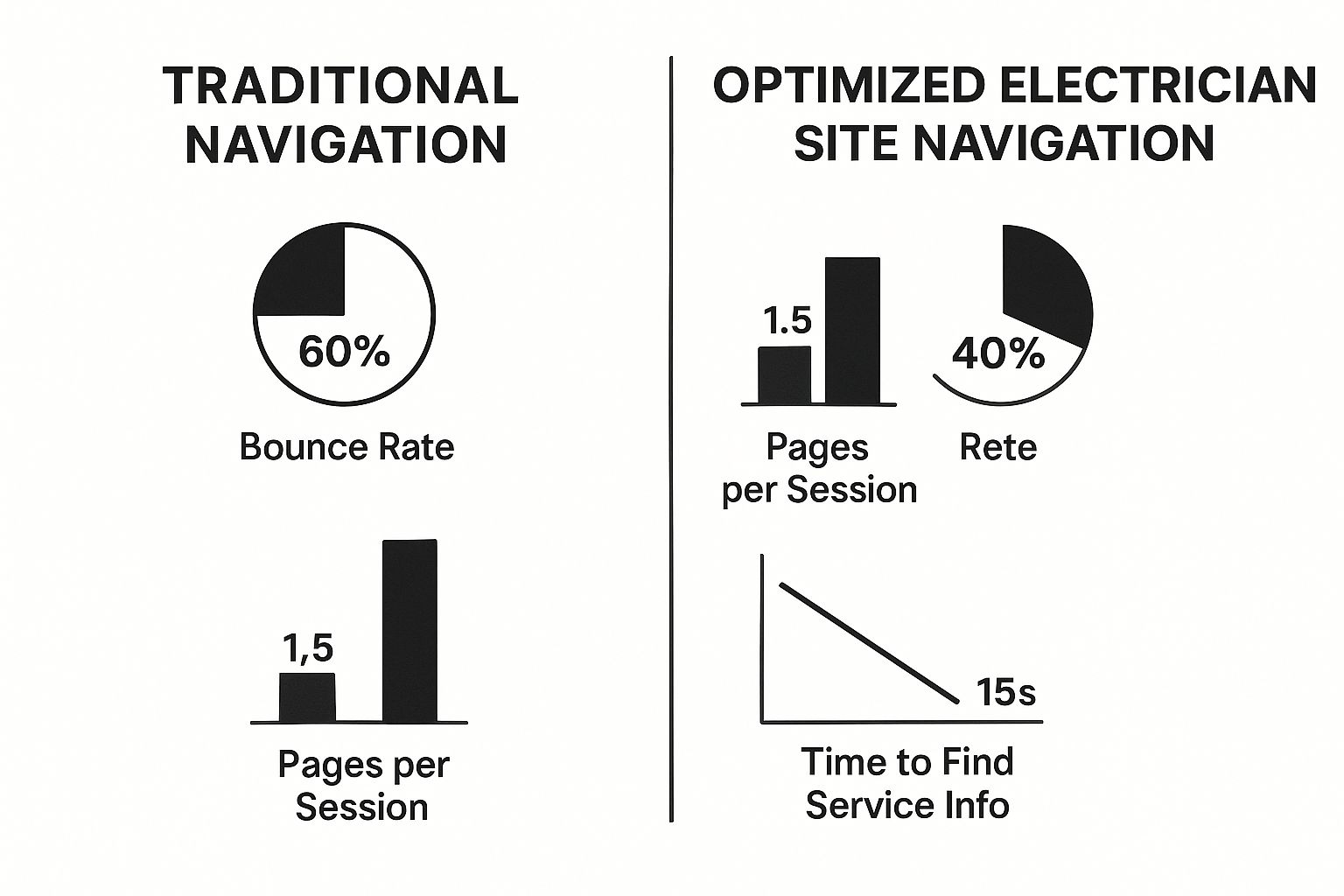
The data here is clear: an optimized site with intuitive navigation keeps users engaged and helps them find what they need three times faster.
By putting these essential features in place, your website stops being a cost and starts becoming an active part of your sales process. Each element works together, creating a seamless path that takes a curious visitor and turns them into your next customer.
For a deeper dive into putting all these pieces together effectively, check out our ultimate electrician website design guide for more advanced strategies.
Get Found Online with Local SEO for Electricians

A beautiful website is a great start, but it’s completely useless if local customers can’t find it. A stunning site buried on page ten of Google is like having a top-of-the-line work van with no gas—it looks impressive but isn’t going anywhere. This is where local search engine optimization (SEO) comes in.
Local SEO is how you make your business pop up in search results for customers in your immediate area. It’s what gets your phone to ring when a frantic homeowner searches “emergency electrician near me.” The good news? You don’t need to be a tech wizard to get the ball rolling.
Understanding What Your Customers Search For
The foundation of any solid SEO strategy is getting inside your customer's head. You need to know the exact words and phrases they’re typing into Google. While you might call your service "residential electrical repair," a customer is far more likely to search for something like "fix broken outlet" or "panel upgrade cost in [Your Town]."
Your first mission is to identify these keywords. Think from the customer's perspective and brainstorm all the problems they're facing that you can solve.
- Emergency keywords: "24/7 electrician," "power out help," "sparking outlet repair."
- Service-specific keywords: "EV charger installation," "recessed lighting installer," "whole house surge protector."
- Location-based keywords: "[Your City] electrician," "electrician in [Your Neighborhood]."
Once you have this list, you can start weaving these terms throughout your website. This tells search engines like Google what your business is all about and where you operate, making it much easier for them to connect you with the right local customers.
Optimizing Your Website Pages
With your target keywords ready, the next move is to strategically place them in key areas of your website. This is what we call on-page SEO, and it’s how you tell search engines precisely what each page is about.
You'll want to focus on these critical spots for every service page:
- Title Tag: This is the main headline that shows up in the browser tab and search results. It needs to be short and sweet, including your main keyword and location. For example: "Expert EV Charger Installation in Dallas | Your Electric Co."
- Header Tags (H1, H2, H3): Use your keywords naturally in your page's headings and subheadings. The main title of your page should always be an H1 tag, with supporting sections using H2s and H3s.
- Page Content: Write clear, helpful content that actually answers your customers' questions about a service. Weave in your keywords and related phrases naturally, but never force them in where they don’t belong.
The goal is to write for humans first and search engines second. Create genuinely useful content that solves a problem for your visitor. Google's algorithm is smart enough to reward high-quality, relevant content that keeps people on your site.
Mastering Your Google Business Profile
For any local service business, your Google Business Profile (GBP) is arguably your most powerful SEO tool. It’s that free business listing that appears in Google Maps and the "Local Pack" at the top of search results. Optimizing this profile isn’t just a good idea—it’s absolutely essential for getting found locally.
Think of your GBP as a mini-website that lives directly on Google. A complete and active profile builds massive trust and makes it incredibly easy for customers to call you.
Here’s your checklist:
- Complete Every Section: Fill out every single field you can—business name, address, phone number, hours, and service areas. Don't skip anything.
- Choose Accurate Categories: Your primary category must be "Electrician." Then, add secondary categories like "Lighting Contractor" or "EV Charging Station Installer" if they fit what you do.
- Upload High-Quality Photos: Add pictures of your team on the job, your branded vans, and your best work. Posting new photos regularly shows Google your business is active.
- Use the Q&A Feature: Proactively add and answer common questions you get from customers about your services or pricing.
The most critical piece of your GBP puzzle is customer reviews. Consistently getting positive reviews is like SEO gold. It's one of the strongest signals you can send to Google that you run a reputable, trustworthy business, which heavily influences how you rank in local searches. Don’t be shy about asking every happy customer to leave a review—it really can make all the difference.
While the nitty-gritty of SEO can get complex, nailing these fundamentals gives you a powerful start. For electricians looking to go even deeper, exploring a comprehensive guide on SEO for contractors can provide additional strategies to help you truly dominate your local market.
Getting Your Website Live and Keeping It Successful
Getting your new electrician website live isn’t the finish line; it’s the starting pistol. The real work begins now—the ongoing tasks that protect your investment and ensure it keeps generating leads for years to come. Neglecting your site after launch is like buying a brand-new work van and never changing the oil.
Before you flip the switch and make your site visible to the world, a final "pre-flight" check is absolutely essential. This quick but critical process helps you catch embarrassing errors that could turn potential customers away before you even know they were there.
Your Pre-Launch Quality Check
Think of this as your final walkthrough on a job site. You’re looking for any issues, big or small, that could impact the final result.
Run through this simple checklist on both a desktop computer and your own smartphone:
- Test Every Link: Click every single menu item, button, and link on your pages. A "404 Not Found" error is a dead end for a potential customer and an immediate bad impression.
- Submit Your Contact Forms: Fill out and submit every contact or quote request form yourself. Did you get the notification email immediately? A broken form is a lost lead, plain and simple.
- Proofread One Last Time: Read through your main pages—Homepage, About Us, and key service pages. Typos and bad grammar look unprofessional and can erode a customer's trust in your work.
- Check Mobile Responsiveness: Seriously, pull it up on your phone. Is the text easy to read? Is your phone number clickable? With over 60% of searches happening on mobile, a clunky experience is a deal-breaker.
This quick check can save you from making a terrible first impression on your first wave of visitors.
Website Maintenance: The Non-Negotiables
Once you're live, your focus shifts from creation to protection and performance. Regular maintenance isn't some optional add-on; it's a core business task required to keep your digital asset secure and functional. Letting your site's software become outdated is like leaving the door to your shop unlocked—it’s an open invitation for trouble.
Here are the absolute must-dos for ongoing maintenance:
- Install an SSL Certificate: This is what puts the "https" and the little padlock icon in your web address. It encrypts data, protecting your visitors' information. Modern browsers will literally flag your site as "Not Secure" without one, scaring away potential customers.
- Set Up Regular Backups: Your website needs to be backed up consistently—ideally, daily. If your site gets hacked or a software update breaks something, a recent backup is your only lifeline to restore it quickly without losing everything.
- Keep Everything Updated: Your website's platform (like WordPress), themes, and plugins release frequent updates to patch security holes and fix bugs. Applying these updates as soon as they're available is your number one defense against hackers.
Your website is a living asset, not a static brochure. Consistent maintenance is the proactive work that prevents costly emergencies down the road, ensuring your site remains a secure and reliable tool for your business.
Tracking Performance with Simple Analytics
You can't improve what you don't measure. Setting up a simple analytics tool, like the free Google Analytics 4, is crucial for understanding how your website is actually performing. It gives you the data to make smart, informed decisions instead of just guessing what works.
This isn't about getting lost in complex reports. It’s about answering a few key questions:
- How are people finding me? Are they coming from Google search, Facebook, or by typing your URL directly?
- Which pages are most popular? Are visitors spending their time on your "EV Charger Installation" page or your project gallery?
- How many visitors turn into leads? Tracking form submissions and phone calls tells you your conversion rate—the ultimate measure of success.
Understanding this data is the foundation of your online strategy. For instance, if you see that most of your traffic comes from organic search, it confirms that local SEO is a key to business success. This allows you to double down on what’s already working to attract more customers in your service area. Making data-backed improvements over time is how you turn a good website into a lead-generating machine.
Common Questions About Electrician Websites
When you're thinking about a new website, it's completely normal to have questions about the cost, timeline, and how you'll manage it all. These are real-world business decisions that hit your budget and your schedule. Let's break down some of the most common questions we hear from electricians to give you some clear, no-nonsense answers.
The first, and usually biggest, question is always about the budget. How much should a good, professional website for an electrician actually cost? The honest answer is that it really depends on which path you take.
How Much Should I Budget for a Website?
Thinking about cost isn't a single number; it's more about understanding three different tiers, each with its own price tag and level of hands-on work from you.
- DIY Website Builders: Platforms like Wix or Squarespace are the cheapest route, typically running between $20 to $50 per month. But be warned: what you save in money, you pay for with your own time. You’re the one designing, writing, and launching everything.
- Freelance Developers: Hiring a freelancer to build a standard business site usually falls in the $2,000 to $8,000 range. Quality can be all over the map, so it's absolutely critical to vet their portfolio and see if they've built effective sites for other trade service businesses.
- Professional Agencies: Working with a specialized agency often starts at $10,000 and can go up significantly from there. This is your all-inclusive option, giving you a professionally managed process from strategy and design all the way through launch and ongoing support.
How Long Until My Website Brings in Leads?
This is a big one. Launching a new website doesn't mean your phone starts ringing off the hook the next day. A brand-new site is like having an unlisted phone number—it takes time for search engines to find it, understand what it's about, and start trusting it.
You might see a few leads trickle in from people typing your URL directly or from hyperlocal searches within the first one to three months. But for that consistent, reliable flow of organic leads that SEO drives, you need to be patient. Plan on a timeline of six to twelve months. That gives your content enough time to gain traction and for your site to build real authority with Google. To speed things up, it helps to understand the 3 crucial SEO elements that boost website traffic right from the start.
A website is a long-term asset, not a short-term campaign. The initial investment in a quality launch and consistent SEO pays dividends for years to come by building a predictable pipeline of jobs.
Can I Update the Website Myself?
Whether you can make your own updates really comes down to the platform your site is built on. A user-friendly content management system like WordPress, which powers over 43% of all websites, is designed so business owners can manage it without being a tech wizard. You can easily jump in to update text, swap out photos, or publish a new blog post.
On the other hand, if your site is a fully custom-coded solution, you’ll probably have to call a developer for even small changes. That can lead to frustrating delays and extra costs you weren't planning on. For most electricians, a well-built WordPress site strikes the perfect balance between a professional, high-end design and the freedom to manage your own content.
Navigating the world of web design can feel like a lot, but it doesn’t have to be. We build powerful, custom websites designed to do one thing: make your phone ring. Book a strategy session with Core6 Marketing today to see how we can help you win more jobs.